Repository navigation
Add Device Tests, Apply Fixes for Bugs Found - #3344
Conversation


 TheCodeTraveler
changed the title

…evice tests

- CameraProvider (Windows): the camera refresh skips a camera that InitializeCameraForCameraView could not open, instead
  of reading the VideoDeviceController of a MediaCapture that never initialized (its getter throws, so one such camera
  made the whole refresh fail). New Windows device test:
  CameraProviderWindowsTests.RefreshWhileAnotherCaptureHoldsACameraListsExactlyTheCamerasThatCanBeOpened.
  (Copilot review on #3344)
- Device tests: the AttachAndRun tests of the Maui, MediaElement and Camera apps wait for the Loaded and Unloaded events
  they count. OnLoadedAsync returns once the view is loaded, which can come before MAUI raises Loaded on a slow
  emulator (Android API 28 in CI).

Co-Authored-By: Claude Opus 5.5 <noreply@anthropic.com>

|
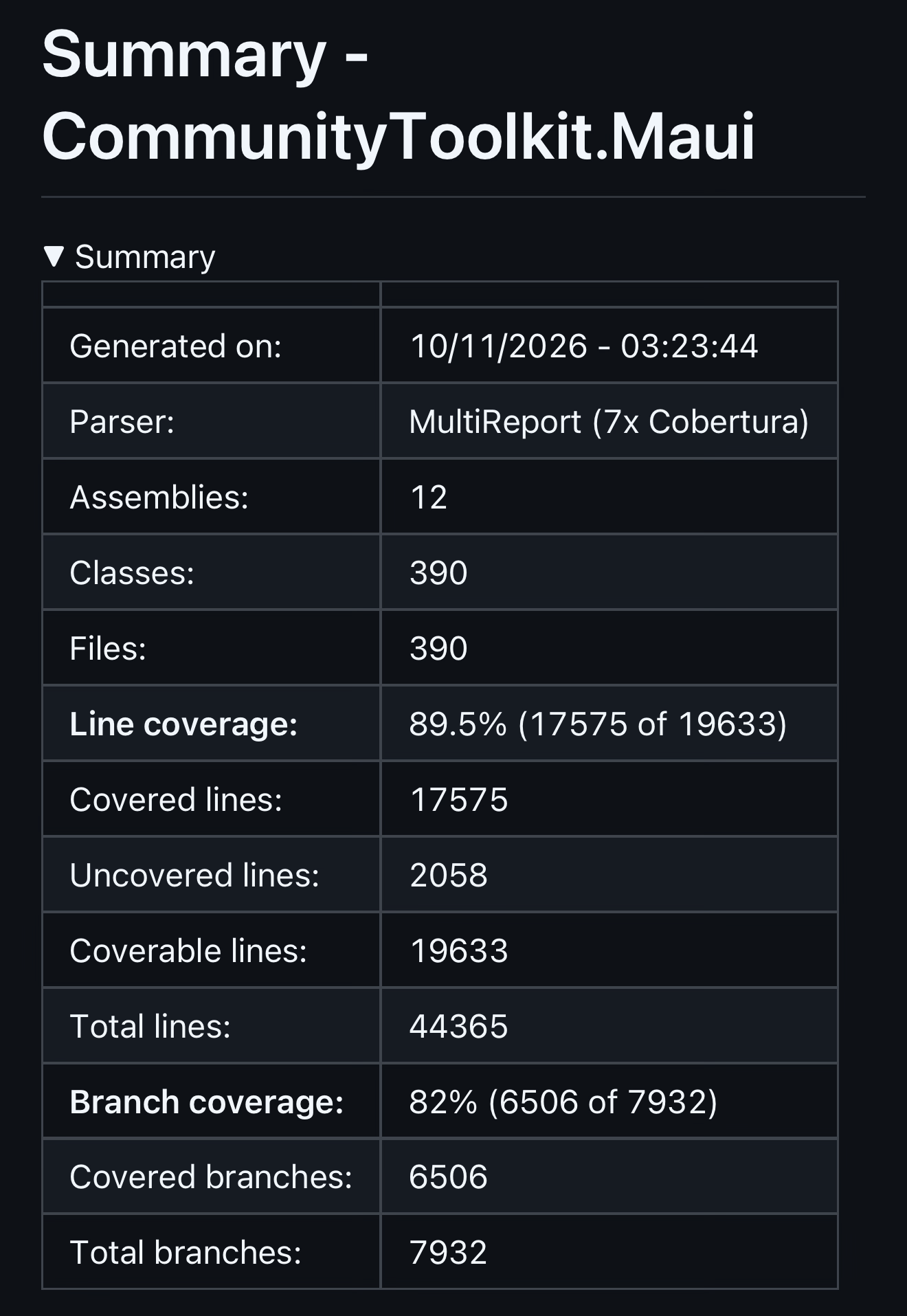
We're now up to 89.5% Line Coverage and 82% Branch coverage across all unit tests and device tests. That's pretty great! Code Coverage Report:
|
 TheCodeTraveler
added
the
breaking change

- Unit tests for CalibreCoverUrl, OpdsEntryStagingCache, EpubPathUtilities,
  EpubArchive and PositionSyncService.
- tests/DisplayBook.DeviceTests: a MAUI app that runs xUnit on the device
  (DeviceRunners), covering code that calls MAUI APIs: BookStorageService,
  BookDatabase, OpdsServerRepository, OpdsCatalogCache, FirebaseAuthService
  (SecureStorage), GoogleBooksOptions (Preferences) and the value converters.
  Modelled on CommunityToolkit/Maui#3344.
- tools/coverage.ps1: unit tests + Windows device tests under dotnet-coverage,
  merged into artifacts/coverage/coverage.xml (Visual Studio XML).
- .github/workflows/build.yml: build, tests and coverage between the
  SonarQube Cloud scanner's begin/end.
- Android signing: the keystore and its passwords leave the repository. They
  now come from Secrets.local.props locally and from repository secrets in CI;
  without them Android builds sign with the debug key.
2cda4d3 to
3f57379
Compare


… no longer makes Show throw

DateTimeOffset.Now.Add(Duration) throws ArgumentOutOfRangeException when the sum passes DateTimeOffset.MaxValue or MinValue, so Show threw for a Duration such as TimeSpan.MaxValue, although DismissAfterDurationAsync already treats such a Duration as never. C#/WinRT also throws when AppNotificationListing reads back an Expiration whose local time passes DateTime.MaxValue, which a cap at DateTimeOffset.MaxValue hits east of UTC. The expiration is now capped one day before DateTimeOffset.MaxValue and a zero or negative Duration expires at the time of Show. Device tests check the expiration of a TimeSpan.MaxValue Snackbar and show a TimeSpan.MinValue Snackbar.

Co-Authored-By: Claude Opus 5.5 <noreply@anthropic.com>
…overlaps the capture-session reset of the test's own ImageCapture unbind

StartVideoRecordingDuringARecordingWhoseImageCaptureIsNotBoundBindsTheImageCaptureAgain unbinds the ImageCapture during a recording, which makes CameraX reset its capture session, and started the second recording right away. In the .NET 11 rehearsal of #3331 (CoreCLR on Android) that rebind came during the reset once, CameraX did not open the camera again, and the new recording file stayed empty. CameraX publishes no state for the end of the reset, so the test now waits the two seconds of AssertTheRecordingKeepsRunningAsync first, like its camera-switch sibling; that also checks that the unbind did not end the first recording.

Co-Authored-By: Claude Opus 5.5 <noreply@anthropic.com>
…ng run

Co-Authored-By: Claude Opus 5.5 <noreply@anthropic.com>
… the Shell.TitleView page to the StatusBarBehavior page as the user left it

'Go to Broken Shell.TitleView' replaced the app's Shell with BrokenTitleViewShell, the repro of #2351 from #3189, and gave no way back: 'Click me' went to //MainPage, which left the TabBar and stranded the user on a page without tabs, and the Android back key closed the app. Only a relaunch left the page, which lost where the user was.

The button is now 'Back'. StatusBarBehaviorPage hands its window's Page, the app's Shell, to BrokenTitleViewShell, which sets that same instance back on Back and on the Android back key. Its navigation stack and the StatusBarBehavior page with its view model stay alive while the demo is shown, so the user returns to the page with the color and style they picked, scrolled to where they left it, and the back key there still goes to the Behaviors gallery. The page's StatusBarBehavior applies its settings again when the page is loaded again, so its status bar replaces the demo's LightContent. On Android, setting the Shell back gives the page a new ScrollView that starts at the top, so the page scrolls back to its offset when it is loaded again. The window insets that give the new ScrollView its bottom padding arrive after its first layout, and until then it cannot scroll as far as the old one, at the default font size not at all. ScrollY still holds the old ScrollView's offset, so the page first sets it to the new ScrollView's top, and then scrolls again every 50 ms, for at most 1 second, until ScrollY reaches the offset.

.NET MAUI handles the back key only while the window can go back (a modal page, a pushed page or an open flyout), which this Shell never can, so on Android 13 and later (android:enableOnBackInvokedCallback) the back key closed the app without calling OnBackButtonPressed: BrokenTitleViewShell adds its own OnBackPressedCallback while it is shown.

Since #3189 the title view is no longer broken (walked on Android 36, Android 28, iOS 27.2, Mac Catalyst and Windows), so the button says 'Go to Shell.TitleView'.

Co-Authored-By: Claude Opus 5.5 <noreply@anthropic.com>
… chosen alpha and style

After 'Pop Modal Page', OnNavigatedTo set the status bar to the chosen red, green and blue with an alpha of 1, so the status bar was opaque while the page's Alpha stepper and its Alpha label still showed the chosen alpha, and it left the style of the modal page's own StatusBarBehavior (Default) in place after the user had chosen Light or Dark content.

OnNavigatedTo now applies the view model's StatusBarColor and StatusBarStyle, the values the page's StatusBarBehavior binds to. The Android and iOS check is now a runtime check that leaves out Mac Catalyst, where OperatingSystem.IsIOS() is also true and StatusBar throws NotSupportedException. It also ends the CA1416 warning that SetColor had on the iOS build, where the compiler saw the call as reachable on Mac Catalyst.

Co-Authored-By: Claude Opus 5.5 <noreply@anthropic.com>
There was a problem hiding this comment.
🟡 Changes recommended
Active findings identify unchecked native-view casts and dereferences that can cause runtime exceptions instead of actionable assertion failures when test prerequisites are unmet.
3 open issues

2 resolved since last review

Review effort: Balanced
…compiles the constraints must stay open until the compilation ends

Windows.Media.Speech dereferences NULL when a SpeechRecognizer is closed before its CompileConstraintsAsync work item runs, which crashed the Windows unpackaged device test app (0xC0000005). The new test releases a compiling recognizer by stop, dispose and newer start in one main-thread turn and asserts it is closed only afterwards; a second test guards the cancelled-start contract. A compilation can end before its start waits for it, so these tests and the two older mid-compile tests retry such a start on a new implementation, in up to 5 attempts.

Co-Authored-By: Claude Opus 5.5 <noreply@anthropic.com>
…ions it runs have ended

Closing a SpeechRecognizer while its CompileConstraintsAsync is pending crashed the app natively (an access violation in Windows.Media.Speech on a thread-pool thread), reachable through StopListenAsync, DisposeAsync, a newer start or a cancelled start. A per-recognizer lifetime now counts the compile, start and stop operations, which get no token, and closes a released recognizer when the last one ends; callers stop waiting with WaitAsync.

Co-Authored-By: Claude Opus 5.5 <noreply@anthropic.com>
Since #3189 the Shell.TitleView demo is no longer broken, and its button already says 'Go to Shell.TitleView'. The Shell, its two files and the button's click handler (now OnTitleViewShellButtonClicked) follow. Two leftovers of the original repro go too: the Shell's title is 'Shell.TitleView' instead of 'MauiApp1', and the Back button loses its unused name 'CounterBtn'.

Co-Authored-By: Claude Opus 5.5 <noreply@anthropic.com>
|
We're nearly ready to merge! I'm running one final CoPilot Max review now. We'll iterate over its results, then merge this tonight. Here's the latest Code Coverage results. 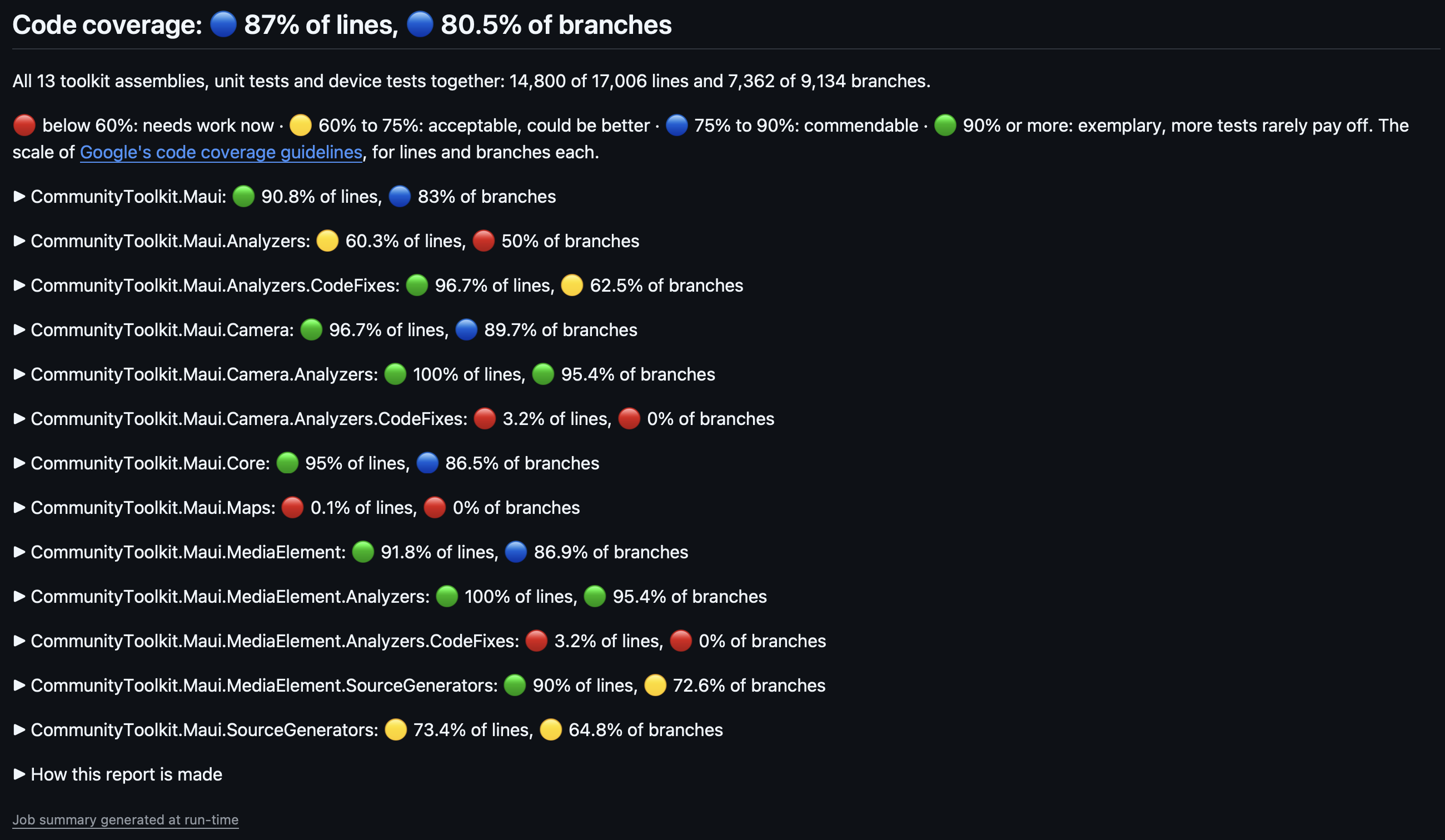
|

 bijington
left a comment
bijington
left a comment
There was a problem hiding this comment.
Approved with a couple of comments, the one that I am unclear about is the linker status of the camera package. Great work
… where the toolkit gives the style back

On iOS 26.x UINavigationController reports DarkContent (light appearance) or LightContent (dark appearance) instead of Default, while iOS 18 and 27 report Default. StatusBarStyle.Default gives every view controller its own style back, so seven tests that expected Default for a navigation controller failed on iOS 26.5 although the toolkit behaved as documented.

IosStatusBarStyle.UIKitStyle calls UIKit's own implementation directly (the toolkit's recorded replaced one on .NET 10), so a style the toolkit failed to clear still fails the assertion. AssertStatusBarStyleAsync and ASecondReplacementKeepsTheReplacedImplementations expect it where Default is requested.

Co-Authored-By: Claude Opus 5.5 <noreply@anthropic.com>
…turns back to portrait

On iOS 26.x the color view kept height 0 after landscape to portrait until the next StatusBar call: UIKit lays out the window's subviews before it updates the scene's status bar frame and does not lay them out again, and the view sizes itself only in LayoutSubviews. After a resize the view now asks for one more layout on the next main-queue turn, which reads the updated frame. On iOS 18 and 27 that pass finds the same geometry and does nothing.

Co-Authored-By: Claude Opus 5.5 <noreply@anthropic.com>
…simulator

The xcode-27 image has iOS 27.x simulators only, so iOS 26 was never tested in CI, and nine StatusBar tests failed on iOS 26.5 unnoticed. device_tests_ios_app builds the iOS app once on xcode-27 (no coverage) and uploads it as a tar, which keeps the executable bit. device_tests_ios_runtime tests it on macos-26, whose image has the iOS 26.5 runtime, so nothing is downloaded. The iOS 27.2 job keeps its coverage build; the 26.5 leg collects none. Both new jobs are in the Device Tests gate.

run.ps1 gets -Runtime, which it passes to ios.ps1, and rejects it with -Udid (exit code 3). README, LOCAL.md and the coverage note of the Build workflow follow.

Co-Authored-By: Claude Opus 5.5 <noreply@anthropic.com>
… rate that the player settles at

NativePauseDoesNotChangeTheSpeed failed once on the new iOS 26.5 leg (the rate read 1.5 after the pause). On iOS 18 and 26, not 27, AVPlayer reports each rate again on the main queue once its player has applied it, so after a rate of 1.5 and a pause in one main-loop turn the rate reads 1.5 again for about a millisecond before it is 0 again. It reproduces with a bare AVPlayer and no toolkit code, and playback never resumes. The test now waits until the rate is 0, which still fails when something restarts the player, and keeps its Speed assertion.

Co-Authored-By: Claude Opus 5.5 <noreply@anthropic.com>
…SDK already applies

The SDK nests TestAssemblyPage.xaml.cs under TestAssemblyPage.xaml by convention, so the explicit Compile Update item changed nothing (from Shaun Lawrence's review).

Co-Authored-By: Claude Opus 5.5 <noreply@anthropic.com>


Description of Change
This PR builds on @ne0rrmatrix's work in #3277. It adds device tests for the platform code the net10.0 unit tests cannot reach, runs them in CI on every platform, and fixes the bugs the tests and the Sample app walks found.
Review guide (for maintainers)
src/CommunityToolkit.Maui*, except the test projects;samples/;src/CommunityToolkit.Maui.DeviceTests*) and their entries insrc/CommunityToolkit.Maui.slnxandsamples/CommunityToolkit.Maui.Sample.slnx;eng/;.github/: workflows, actions, instructions,copilot-instructions.mdand the device-test entry ofdependabot.yml;.config/dotnet-tools.jsonandNuGet.config;InternalsVisibleTolines inDirectory.Build.props;CONTRIBUTING.mdandREADME.md.CloseAsyncwhen another page opened above the popup while the call waited. Before the fix, the call could close that page and hang.What the device tests cover
CommunityToolkit.Maui.DeviceTestscovers CommunityToolkit.Maui, CommunityToolkit.Maui.Core and CommunityToolkit.Maui.Maps:Device-test apps
CommunityToolkit.Maui.DeviceTests, tests every package, like the unit tests: CommunityToolkit.Maui, .Core, .MediaElement, .Camera and, on Windows, .Maps.git mv.CommunityToolkit.Maui.DeviceTests.Shared: shared test code.CommunityToolkit.Maui.DeviceTests.Runners: the vendored runner.CommunityToolkit.Maui.DeviceTests.Runners.SourceGen: the runner's source generator, built against the toolkit'sCodeAnalysisVersion.pm grantrun in aPermanentAndroidGrantscollection, which a collection orderer runs last. So the SpeechToText tests that need RECORD_AUDIO denied still run first.MediaElementInfrastructureTests,CameraInfrastructureTests.DeviceTestsInfrastructureTestsnow covers every class: feature categories, capability names, run-time skips.MauiTestActivityruns one test pass per process.ConfigurationChangesdoes not list (font scale, locale, an overlay). The recreated activity'sOnCreatestarted a second pass in the same process.TestWindowdrops a destroyed activity.UserStoppedTypingBehavior,MaxLengthReachedBehavior) type only once the soft keyboard shows steadily. Test-only.MauiContextprovides aNavigationRootManager, which a NavigationPage and MAUI 11's Shell read.UIColorper pixel on the thread pool crashed under CoreCLR.StartVideoRecordingDuringARecordingWhoseImageCaptureIsNotBoundBindsTheImageCaptureAgainwaits 2 s after its own ImageCapture unbind, like its camera-switch sibling. So its second start no longer overlaps CameraX's capture-session reset, which once left a 0-byte recording on .NET 11.CI
dotnet-build.ymlcalls the newdevice-tests.yml, which has noprojectinput. Each platform builds and runs the one app in Release, on seven legs:xcode-27), and iOS 26.5 (macos-26, which tests the app thatxcode-27built once);eng/devices/run.ps1, the same command as a local run..github/workflows/shared.envholds the tool versions the workflows share.Running the device tests locally
eng/devices/run.ps1, runs the device tests on every platform the machine can run.eng/devices/LOCAL.mdexplains how to run and debug them.eng/devices/README.mddescribes the scripts and the CI jobs.CONTRIBUTING.mdandREADME.mdlink to both..github/copilot-instructions.mdand.github/instructions/device-tests.instructions.mdgive coding agents the same steps.run.ps1 -Project MediaElementand-Project Camerafail with a message that names the filter to use:-TestFilter 'Category=<name>'.eng/devices/README.mdhas two ready-madeSkipCategorieslists: "everything but Camera" and "everything but MediaElement".Dependabot
.config/dotnet-tools.json./samplesentry ignores these four, so they are not updated twice.Product fixes
StartCameraPreviewand the commands report failures throughErrorOccurredandMediaCaptureFailed.SelectedCamera.StopCameraPreviewcancels a start, a video-recording start or a camera switch that still waits for the platform.StartCameraPreviewafterSetExtensionModeon a stopped preview shows the selected camera.MediaCaptureraces, a start while the preview runs, andStopCameraPreviewduring a recording.StopVideoRecordingwith a cancelled token stops the recording and throwsOperationCanceledExceptionon every platform.StartVideoRecordingduring a recording ends the running recording first.CameraViewHandler.PlatformViewFactoryno longer makesCameraViewthrowInvalidOperationException(older than this PR). The camera shows in the factory's view.ZoomFactoragain instead of zoom 1.IsTorchOnis true; before, it stayed off.Sourcechange is reported throughMediaFailed.Speed.MediaOpenedafter the disconnect.MediaElementFromStreamPageis no longer disposable: the window's service scope kept every page that was opened.StartListenAsyncthat still waits for the platform (on Windows, and for a start from a background thread on iOS and Mac Catalyst):StopListenAsyncorDisposeAsyncends that start without an exception, where it threw aNullReferenceExceptionorObjectDisposedException.StartListenAsyncduring the wait releases the waiting start's recognizer. The waiting start then ends without listening and without an exception, instead of going on with the newer start's recognizer.OperationCanceledExceptionand stop a newer start's recognition.BackgroundColorprecedence and the theme default.ShowPopupAsynccompletes, andClosedis raised, when navigation removes the popup withoutCloseAsync.CloseAsyncof a popup shown on a modalNavigationPageunder a Shell closes only the popup.PopupBlockedExceptionwhen a popup or page was shown above its popup meanwhile. A tap outside or Back does nothing in that case. Before, the close popped that popup or page and hung, which blocked every later popup in the app.ShowPopupAsync,CloseAsyncandClosePopupAsyncthrowOperationCanceledExceptioninstead of never completing when the app cancels the navigation (aShell.Navigatinghandler, orWindoworApplicationModalPoppingsettinge.Cancel).SetStyleon iOS with .NET 10.main(not from this PR): the status bar color is applied only to the app's windows. 4 new iOS StatusBar device tests cover it.StatusBarBehavior.PressedImageSource).Errorsthread andIsRunning.Showwaits up to 1 s for Windows to list it.Satellite.Emailchanges.FillOption.DialogFragmentServiceon Android.ViewOrderwhen the app setContentViewHandler.PlatformViewFactory(older than this PR).ArgumentNullExceptionfor a null argument it cannot handle.CommunityToolkit.Maui.Mapsis marked[Obsolete]and recommendsMicrosoft.Maui.Controls.Maps. The package is removed in Update to .NET 11 #3331.Button(see item 31 under Additional information):WidthRequestandHeightRequestthat the Button sets, or at 80 pixels. So on iOS and Mac Catalyst the Button no longer grows until it is as wide as the screen (older than this PR).Showno longer throwsArgumentOutOfRangeExceptionfor aDurationsuch asTimeSpan.MaxValueorTimeSpan.MinValue(older than this PR).Separatorslist with one entry splits at that entry, as documented, instead of atSeparator(older than this PR).ShowPopupAsync, so a double tap opens one popup instead of two. Proven on Android: one dim layer and one Back press, where the old code stacked two popups.ConfigureHttpClientDefaults); the two typed-client registrations never applied.MediaElementFromStreamPagecatches the handler'sExecutionRejectedException, which would have crashed the app.Breaking changes: only two items touch the API at build time:
StatusBarBehaviorand the Maps deprecation. The complete list, grouped by API, behavior, and setup or dependencies, is under Additional information.Linked Issues
Partially Fixed (will be finished in a future PR): #3317, #2894, #2691, #3063, #2952, #1987, #2645, #3220, #3248, #2602, #3190
Partially Fixed (already closed, will be finished with #3317): #2383, #2950
Related, not fixed by this PR:
CaptureImagewas already serialized by Return Camera Image (Stream) fromICameraView.CaptureImage()#2695.ShouldMakeChildrenInputTransparentnow takes effect when it changes.main).StatusBar.SetColorandStatusBarBehavior.StatusBarColor, and in a FAQ entry in CommunityToolkit.Maui Docs Updates for Device Tests Fixes + Findings MicrosoftDocs/CommunityToolkit#665.PR Checklist
approved(bug) orChampioned(feature/proposal)mainat time of PR: not rebased. Merge commits keep it up to date withmainthrough 383e96c ([iOS] StatusBar: apply the color only to the app windows #3373), the current tip ofmain.Additional information
Tested on (CI on 6634c69 passed on every leg, 0 failed):
StopVideoRecordingand to a start during a recording (item 12).Running the device tests:
pwsh ./eng/devices/run.ps1runs every platform the machine can run. Seeeng/devices/LOCAL.md.Breaking changes and behavior changes (for the GitHub Release notes)
ArgumentNullExceptionat the call, in all five libraries.<queries>entry to Android apps and referencesSystem.Speech10.0.11 on Windows.All packages
ArgumentNullExceptionat the call. Public and protected members of the five libraries now guard the non-nullable reference parameters they cannot handle (about 275 guards).NullReferenceExceptionlater (or was stored silently) fails at the call, with aParamName. What to do: fix the caller.IProgress<double>or aPaintbackground of null.BasePlatformBehaviorguards onlybindable. A null platform view passes through, because the AndroidIconTintColorBehavioraccepts it.<queries>entry for the launcher (MAIN/HOME) to the app's merged manifest through the package's library manifest (src/CommunityToolkit.Maui.Core/AndroidManifest.xml). Badge needs it on Android 11 and later. If your app or Play listing reviews<queries>, check the merged manifest.System.Speech10.0.11 (it was 10.0.1). No action is needed unless you pin the package. This comes from Update Unit Tests Packages #3288 on main, not from this PR.ApiCompat found no removed or changed public type or member in the five libraries, on any target framework. Baselines: the released packages CommunityToolkit.Maui and CommunityToolkit.Maui.Core 15.0.1, Camera 6.1.0, MediaElement 10.0.0 and Maps 4.0.0.
PopupdeclaresIPaddingElement, which it already inherited fromContentView(ApiCompat lists it only on the Windows target);GravatarImageSourcedeclaresIStreamImageSource, which it already inherited fromStreamImageSource, and overridesCancel()(see GravatarImageSource, after that ApiCompat run);[Obsolete]on the Maps types (see Maps);[SupportedOSPlatform("android23.0")]on the AndroidStatusBarBehavior(see StatusBar and StatusBarBehavior).New API in this release from other PRs (not this one):
CameraView.ErrorOccurredandErrorOccurredEventArgs(CameraView: Fixed crash on Windows when app has no camera access anymore #3299)MauiMediaElement.RefreshPlaybackControlsVisibilityandDetachFromParentViewControlleron iOS and Mac Catalyst (Fix iOS MediaElement support for multiple ItemsViews and windows #3222)DefaultPopupSettings.BackgroundColorDarkandOnInitializing(AddPopupsupport forAppTheme, IntroduceDefaultPopupSettings.OnInitializing#3345)NumericValidationBehavior.Interval(Add interval validation to NumericValidationBehavior #3329)AvatarView
HorizontalOptions,VerticalOptions,HeightRequest,WidthRequest,Padding,Stroke,StrokeThicknessandStrokeShapeare no longer local values, so an implicit AvatarView Style applies (and aBorderStyle withApplyToDerivedTypes).Texton every platform; iOS, Mac Catalyst and Windows showed an empty circle. SetTextto "" for a blank circle.GravatarImageSourceasks for its picture only after its image has a size. So:Emailchanges or a new load succeeds.Badge
<queries>entry for the launcher (MAIN/HOME) to Android apps; Badge needs it on Android 11 and later (see All packages).Badge.SetCountwrites one trace line and returns, instead of throwing aCOMExceptionthat ended the app. No badge appears, so package the app if you need the taskbar badge.CameraView
ErrorOccurredEventArgs,MediaCaptureFailedEventArgsandCameraInforeject null for their non-nullable members.StartCameraPreview(CancellationToken)no longer throws for a camera that cannot start (except in the Android failed-connection case below). It raisesErrorOccurredon every platform.OperationCanceledException.InvalidOperationException.CaptureImageCommand,StartVideoRecordingCommandandStopVideoRecordingCommandreport throughMediaCaptureFailed.StartCameraPreviewCommandandStopCameraPreviewCommandreport throughErrorOccurred.SelectedCamera, applyingImageCaptureResolution) raiseErrorOccurredinstead of ending the app.CaptureImagebefore the camera has started throwsCameraExceptioninstead of waiting until its token is cancelled.ErrorOccurredandMediaCaptureFailedinstead of relying on try/catch.ErrorOccurredfor a failed connection. AStartCameraPreviewcalled while theCameraViewconnects to its camera waits for the connection.ErrorOccurred, thatStartCameraPreviewthrows the same failure to its caller instead of raisingErrorOccurredagain.StartCameraPreviewCommanddoesn't report it again.StopCameraPreviewcancels starts that still wait.StopCameraPreviewandStopCameraPreviewCommandnow cancel a pendingStartCameraPreview, a pendingStartVideoRecording(both overloads), the start the view makes when it connects its camera, and a camera switch.OperationCanceledException, with noErrorOccurredorMediaCaptureFailed. A start that a stop interrupted needs a new start.StartCameraPreviewwith an already-cancelled token throws and no longer starts the session.StartVideoRecordingduring a recording replaces it: the new stream receives the video, and the earlier recording's video is discarded. Camera 6.1.0 ignored the second start; iOS and Mac Catalyst already replaced it.StartVideoRecordingreturns only once the platform has started the recording (Await native video recording start acknowledgment #3311), soawaitit before relying on the recording. On iOS and Mac Catalyst, a start cancelled while it waits releases the recording state.StopVideoRecordingwaits for a pendingStartVideoRecording.StartVideoRecordingor a secondStopVideoRecordingthat arrives while a stop waits for Media Foundation to finish the recording waits for that stop.StopVideoRecordingthrowsCameraExceptionon Android, iOS and Mac Catalyst when the platform reports a recording with no playable video. A recording the platform ended early that has usable video is still returned.StopVideoRecordingstill returns the video, and the failure is raised throughErrorOccurred. Selecting another camera during a recording waits until the recording stops or is replaced.StopVideoRecordingwhose token is cancelled already or while the stop finishes the video:OperationCanceledException, as on Android, iOS and Mac Catalyst. It used to ignore the token and return the video.StopVideoRecordingreturns the video. AStartVideoRecordingthat comes first discards it and puts its stream back, as for a replaced recording.StopVideoRecordingreturnsStream.Nullon every platform.StopVideoRecordingCommandends without an event.OperationCanceledExceptionand callStopVideoRecordingagain to get the video.StartVideoRecordingduring a recording ends and finishes the running recording and discards its video.StopVideoRecordingbefore a new start.ErrorOccurredandCameraException. On Android, don't rely on a second start being ignored.StartVideoRecordingafterStopCameraPreview, or beforeStartCameraPreview, starts the camera and then the recording. Android already did; Camera 6.1.0 recorded nothing on iOS, Mac Catalyst and Windows.StopVideoRecordingon Android, iOS and Mac Catalyst, it turns off only once the next stop returns the video.StartVideoRecordingthrows the failure: for example aCameraExceptionwithout a camera or without the camera permission, or on Windows anUnauthorizedAccessExceptionwhen the privacy settings block the camera.StartVideoRecordingCommandreports it throughMediaCaptureFailed.StartCameraPreviewafterSetExtensionModeon a stopped preview shows theSelectedCamera. Camera 6.1.0 kept showing the camera that was selected whenSetExtensionModeran.StartCameraPreviewwhile the preview already runs is a no-op.StartCameraPreviewwhile an earlier start is still opening the camera releases that start'sMediaCapture, so the camera is never held twice.StopCameraPreviewduring a recording ends the recording, like on Android. A laterStopVideoRecordingreturnsStream.Null, so do not expect a video from a recording that a stop ended.CameraViewHandler.PlatformViewFactory:MediaPlayerElementshows the preview. Another element shows none, and a warning is written to the trace output.ZoomFactorandIsTorchOnagain after another screen, such as FileSaver's save dialog or Home.ColorAnimationExtensions
BackgroundColorToandTextColorTowith arateof 0 throwArgumentOutOfRangeExceptionfrom the call. Before, the error came later on the animation ticker and ended the app. Pass a rate above 0.DialogFragment (Android)
DialogFragmentServicelays the dialog of a modal page out like the activity's window, for every status bar color.DrawingView
GetImageStreamwith no lines returnsStream.Nullinstead of throwingInvalidOperationException, and a NaN image size, or one that is infinite on both sides, throwsArgumentException. HandleStream.Nullwhere you caught the exception.ImageOptions.DesiredSizehas its pixel size rounded half away from zero on Android, iOS and Mac Catalyst, as Windows already did. A 1920 x 1080 target of a 411 DIP canvas gives 1920 x 934 on Android, where it gave 1919 x 934.DrawingLineCompleted, a lost capture raisesDrawingLineCancelled, and a second pointer no longer starts or changes a line. No action is needed unless you worked around the old behavior.DrawActiondraws in a canvas state of its own.Expander
UseMauiCommunityToolkitregisters the Expander layout handler (see Behavior below), so keep calling it at startup. That handler keeps its own platform view even when the app setsLayoutHandler.PlatformViewFactory.ExpanderLayoutHandler, so a handler an app registers forGridno longer applies to the Expander's internal Grid;LayoutHandler.Mapperchanges still apply.LayoutHandler.PlatformViewFactoryno longer creates the platform view of that layout, so the layout keeps the platform view that gives the header this support. The factory still creates the platform views of the app's other layouts, including the ones in the Expander'sHeaderandContent, and on Android also the platform view of that layout.Directioncan be changed again by bindings and Styles.FileSaver and FolderPicker
ArgumentNullExceptionat the call;FileSaverandFolderPickerstill return the exception in the result. (see All packages)progressreports percentages from 0 to 100. It reported fractions from 0 to 1 during the copy, then a final 100, so remove any* 100you applied.FilePathis itscontent://URI. It used to fail withFileSaveException. Open such a path with the ContentResolver.fileNameorstream(and a nullinitialPathfor FolderPicker) comes back as anArgumentNullExceptionin the result, without showing the picker.GravatarImageSource
HttpClient.Timeoutlimits the whole download, and a body that fails halfway givesStream.Null.CancellationToken.Nonenever throws. Only a token that you pass and cancel makesGetStreamAsyncand the defaultStreamfunction throwOperationCanceledException, instead of returningStream.Null. .NET MAUI catches it for the loads that it cancels itself, so a view keeps the picture of the load that replaced it.Cancel()ends only the loads started without a cancelable token, which then returnStream.Null. Its task always completes withtrue.StreamorGetStreamAsyncwith your own token.WidthRequestandHeightRequestthat the Button sets, or at Gravatar's default 80 pixels, and again when those requests change. It was requested at the Button's laid-out size, so on iOS and Mac Catalyst each picture made the Button larger until it was as wide as the screen (older than this PR).Image,ImageButtonandAvatarViewstill request the size they are laid out at.Buttonwithout size requests now gets an 80-pixel picture instead of one the size of the laid-out Button: on a 420 dpi Android screen, a 30 dp icon instead of 15 dp. SetHeightRequeston the Button for a smaller picture.ContentLayoutTop or Bottom) needs aHeightRequestthat leaves room for the picture.Textneeds aHeightRequestorMinimumHeightRequest. The .NET MAUI app template's Button style setsMinimumHeightRequestto 44.ImageOpenedevent, which a picture decoded from a stream has already raised.KeyboardExtensions
IsSoftKeyboardShowingcalled from another thread blocks until the UI thread answers. The tasks ofHideKeyboardAsyncandShowKeyboardAsynccomplete once the UI thread has done the work.Maps
CommunityToolkit.Maui.Mapsis deprecated.UseMauiCommunityToolkitMaps, itsAppBuilderExtensionsclass and the Windows handlerMapHandlerWindowsare[Obsolete].MapinMicrosoft.Maui.Controls.Maps, which supports Windows since .NET MAUI 10 (see Setup below). Until then, suppress CS0618 around the call.CommunityToolkit.Maui.Mapspackage, itsusing CommunityToolkit.Maui.Maps;directives and theUseMauiCommunityToolkitMapscall.Microsoft.Maui.Controls.Mapspackage directly; the toolkit package referenced it for you.builder.UseMauiMaps()on every platform.builder.ConfigureEssentials(essentials => essentials.UseMapServiceToken("YOUR_AZURE_MAPS_SUBSCRIPTION_KEY")). There the map is the WinUI 3MapControlbacked by Azure Maps, and it shows no map data without a valid key.Maphas noIsShowingUser, no polygons, polylines or circles inMapElements, no pin labels or info windows, and noMapClicked.MoveToRegion, theStreet,SatelliteandHybridmap types, traffic, scrolling, zooming and pins work.LabelandAddressas plain text, not as HTML, so remove markup from pin labels.Locationis not shown.MapType.Satelliteshows aerial imagery without place or road labels; it was identical toHybrid. UseMapType.Hybridwhere you want the labels.MaskedBehavior
MaxLengthReachedBehavior
MaxLengthReachedEventArgsrejects null for its non-nullable members.MaxLengthReachedBehaviorhides the keyboard only while its own InputView has the focus, and through the view's own window. So Android no longer hides the keyboard of the view the user moved to, and the keyboard goes away in a modal page or a Popup too. No action is needed.MediaElement
FileMediaSourceConverter.ConvertFrom(null)throwsArgumentNullException.MediaFailedEventArgsrejects null for its non-nullable members.Sourcechanges is reported throughMediaFailed.StateChanged,PropertyChangedorPropertyChanginghandler reached the code that setSource, or ended the app when MAUI set it from XAML or a binding.MediaFailed:ErrorMessagenames its type and message, andCurrentStateis not set to Failed.MediaFailed, and checkErrorMessagebefore treating everyMediaFailedas a failed source.SeekToclamps a position outside the media to its start or end and raisesSeekCompleted. On iOS such a seek never completed.SeekTofails with the platform's exception, for exampleInvalidOperationExceptionbefore the player is ready, where that exception ended the app.Play()at the end of the media starts it again on iOS and Mac Catalyst, as on Android.CurrentStatereportsBufferingwhile buffering (it wasPaused) andStoppedat the end of the media.None.MediaElementPagealive 3 of 3 times after it was left (0 of 3 with the fix). The same leak is fixed and tested on Android, Mac Catalyst and Windows.MediaOpenedarrives on the player's worker thread. An open that was still running when the handler disconnected no longer starts the timer again: the timer starts on the UI thread, and only while a handler is attached.MediaElementFromStreamPagewasIAsyncDisposable, so the window's service scope kept every page that was opened.FileMediaSourceConverter.ConvertFromhad an inverted condition. A real path threwInvalidOperationException, and an empty or white-space string returned a source. Now a real path returns theFileMediaSource, and an empty or white-space string throwsInvalidOperationException, as documented.NavigationBar (Android)
Coloris still transparent, but it is now a plain default value, so reading the color no longer makesIsSettrue. As a result:ColororStylegives the window back its original color.Popup
Options.SetPopupDefaults(null)andSetPopupOptionsDefaults(null)no longer store null.async voidPopupExtensions.ShowPopupoverloads throw to the caller instead of posting the exception to theSynchronizationContext.BackgroundColoris null by default, and Styles now apply.Margin,Padding,HorizontalOptions,VerticalOptions,CanBeDismissedByTappingOutsideOfPopupandBackgroundColorare now default values. 15.0.1 set them as local values in the constructor.Popup.BackgroundColorreads null until something sets it.DefaultPopupSettings.BackgroundColor, or in the dark themeBackgroundColorDark: black with AddPopupsupport forAppTheme, IntroduceDefaultPopupSettings.OnInitializing#3345 in this release, where 15.0.1 showed white.BackgroundColorwhere a fixed color is needed, and check popups in the dark theme.ShowPopupAsync. When navigation removes the popup page withoutCloseAsync,ShowPopupAsynccompletes andClosedis raised exactly once. Before, neither happened, and code that awaited it stayed suspended.PopModalAsyncorPopAsynccalled by other code,Window.Pagebeing replaced, or Shell popping the popup out of a modalNavigationPage.Closedhandler can show another popup.WasDismissedByTappingOutsideOfPopupis true. It now means "closed without a result: by tapping outside the popup, or because navigation removed it"; it is false only afterCloseAsync.ShowPopupAsync<TResult>,Resultis null for a reference or nullable type. Reading it for a value type such asintthrowsPopupResultException, as after a tap outside.WasDismissedByTappingOutsideOfPopupfirst. Subscribe toClosedif you must tell a tap from a navigation removal.Closedis raised without a precedingOpened.CancellationTokenused as a timeout keeps working.CloseAsyncandClosePopupAsyncof a popup shown on a modalNavigationPageclose only the popup.CloseAsyncused to pop the whole page and never complete, andClosePopupAsyncthrewPopupBlockedException.PopupBlockedExceptionand pops nothing:CloseAsync,Popup.CloseAsyncandClosePopupAsync(also throughIPopupService) wait for earlier popup operations. When the close finally runs, they check again that the popup is still the page on top.ShowPopupAsyncwas showing, or a modal page your code pushed. They already threwPopupBlockedExceptionand popped nothing when that page was on top at the call.ClosePopupAsyncstill targets the popup that was the most recent when you called it, not the newer one. Call it again to close the newer one.async void) when an earlier tap, Back or navigation has already closed the popup;NavigationPagecancels aPopAsyncthat waited behind a navigation that failed). The popup stays open, and a later tap closes it.ShowPopupAsync,CloseAsyncandClosePopupAsyncthrowOperationCanceledExceptionwhen the app cancels the navigation.Window.ModalPoppingorApplication.ModalPoppinghandler that setse.Cancel, or aShell.Navigatinghandler that cancels),Popup.CloseAsync,Popup<T>.CloseAsync,ClosePopupAsyncandIPopupService.ClosePopupAsyncthrowOperationCanceledException. The popup stays open and usable,Closedis not raised, and the navigation lock is released.Shell.Navigatinghandler cancels the navigation that shows a popup (ShowPopupAsyncof a Shell, or of a page orINavigationunder a Shell root), everyShowPopupAsyncoverload, also throughIPopupService, throwsOperationCanceledExceptionand nothing is shown.ShowPopupand the tap outside or Android Back show nothing, or do nothing, and throw nothing.OperationCanceledException when (!token.IsCancellationRequested).ModalPoppinghandler that cancels makes .NET MAUI retry the pop in a loop, soCloseAsynccannot return. Cancel inShell.Navigatingthere instead.OnDisappearingof a modal page that is closing appears on the page below.WidthRequestorHeightRequestlarger than the window is limited to the window.Openedis raised once per show.PopupClosedandClosedare raised after the navigation lock is released, in the same order as before.RatingView
FillOptionchanges.SelectAllTextBehavior
SelectAllTextBehavioron Windows throwsArgumentNullExceptioninstead ofInvalidOperationExceptionfor a null platform view (only a derived class can reach it).SemanticOrderView
ViewOrderthat the container holds are listed first in its tab focus children, followed by the rest of its content.TabIndexthat the app set is no longer overwritten. The exception: views ofViewOrderthat a control within the container (aScrollView, for example) holds, or that are outside the container, still get aTabIndexfrom the order.ContentViewHandler.PlatformViewFactoryno longer creates the SemanticOrderView's platform view, soViewOrderapplies.CreatePlatformViewin a handler derived fromSemanticOrderViewHandler, and register it afterUseMauiCommunityToolkit.Snackbar and Toast
Toast.ShoworToast.Dismissafter an earlier toast, and aSnackbar.ShoworSnackbar.Dismisswhile a snackbar was shown, removed every notification of the app (AppNotificationManager.RemoveAllAsync). That included the other alert and the notifications the app shows itself, on screen and in the Action Center.Showno longer clears the app's other notifications, a Toast or Snackbar shown while another notification banner of the app is on screen waits behind that banner, as Windows queues banners.Shownow returns once Windows lists the new notification. That takes up to 1 s longer when Windows lists nothing for the app, for example while its notifications are off. A Snackbar whoseDurationis zero or less does not wait.ShowandDismisscalls now take effect in call order. A call whose token is cancelled before its turn removes nothing and throwsOperationCanceledException.ShoworDismissTask inside aShownorDismissedhandler:.Wait()and.Resultdeadlock there.Duration, raisesDismissedonce and runs its action on the UI thread.Showcan take up to 1 s longer while the app's notifications are off (see Behavior above).Showno longer throws for aDurationsuch asTimeSpan.MaxValueorTimeSpan.MinValue.Durationbelow 1 ms shows it for 1 ms, andDismissedis raised once.Duration.SpeechToText
System.Speech10.0.11 on Windows (see All packages).StartListenAsyncwith null options throwsArgumentNullExceptionfrom the call (see All packages: null arguments). With valid options, a canceled token still returns a canceled Task, so awaiting it throwsOperationCanceledException.StartListenAsynccompletes without an exception and without listening, even if its token is canceled afterwards.StopListenAsyncorDisposeAsync(on Windows, also a newerStartListenAsync) is called while the start waits for the platform.StateContainer
StateKeythat is not defined throwsStateContainerExceptionwith its own message and no inner exception. It used to throw the "assigned to multiple StateViews" message, so change any code that matches the message text.StatusBar and StatusBarBehavior
StatusBarBehaviorrequires Android 6.0 (API 23). The Android type is now[SupportedOSPlatform("android23.0")], likeStatusBaralready was.if (OperatingSystem.IsIOS() || OperatingSystem.IsAndroidVersionAtLeast(23)). NotIsAndroidVersionAtLeast(23)alone: it is false on iOS.StatusBarBehaviordeclared in XAML gets no warning.UIViewControllerBasedStatusBarAppearancefrom Info.plist if you set it to false forStatusBar.SetStyle(see Behavior below).StatusBarBehaviorneeds a minimum Android version of 23 or a guard (see API above). CommunityToolkit.Maui's minimum Android version stays 5.0 (API 21), the same as .NET MAUI 10's.StatusBar.SetStyleandStatusBarBehavior.SetStyleno longer needsUIViewControllerBasedStatusBarAppearanceset to false in Info.plist.LightContentorDarkContentreplacespreferredStatusBarStyleuntil the app ends, for every view controller that does not choose its own style (the system pickers included).Defaultgives each view controller its own style back.SetStylecalled off the main thread throwsUIKitThreadAccessException, in Release builds too, so call it on the main thread.StringToListConverter
Separatorslist, as documented; before, it split atSeparator.TouchBehavior
ShouldMakeChildrenInputTransparenttakes effect when it changes.DefaultOpacity,HoveredOpacityorPressedOpacitythrowsArgumentOutOfRangeException, where 15.0.1 accepted it.CurrentHoverStatussays, a release over the element completes the tap (Command,TouchGestureCompleted), and a release outside it cancels.Entered. So a release outside the element could complete, and one over it could leave the press running.UserStoppedTypingBehavior
async voidoverrides ofUserStoppedTypingBehaviorthrow to the caller instead of posting the exception to theSynchronizationContext.UserStoppedTypingBehaviorhides the keyboard only while its own InputView has the focus, and through the view's own window. So Android no longer hides the keyboard of the view the user moved to, and the keyboard goes away in a modal page or a Popup too. No action is needed.UserStoppedTypingBehavior.StoppedTypingTimeThresholdrejects a negative value. A negative value is ignored and the previous value is kept (MAUI logs a warning). Before, it failed insideTask.Delay. Use 0 or more.Validation behaviors
async voidoverrides ofValidationBehaviorthrow to the caller instead of posting the exception to theSynchronizationContext.Errorsis set on the UI thread, andIsRunningis reset after a cancel.🤖 Generated with Claude Code