Repository navigation
Narrow windows keep the sidebar open and push tool controls off-screen #108
Description

Summary
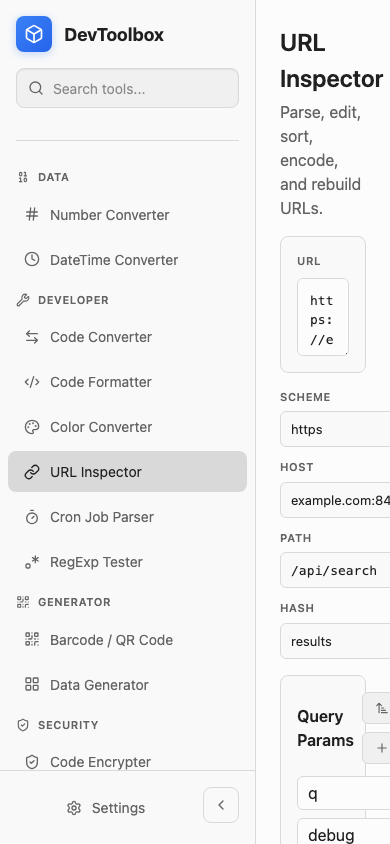
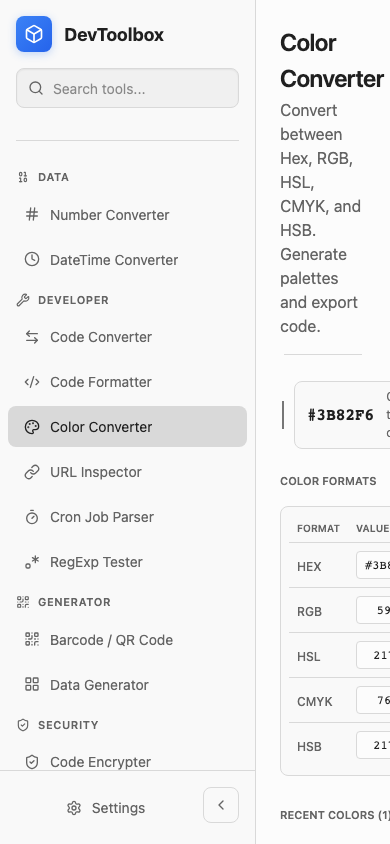
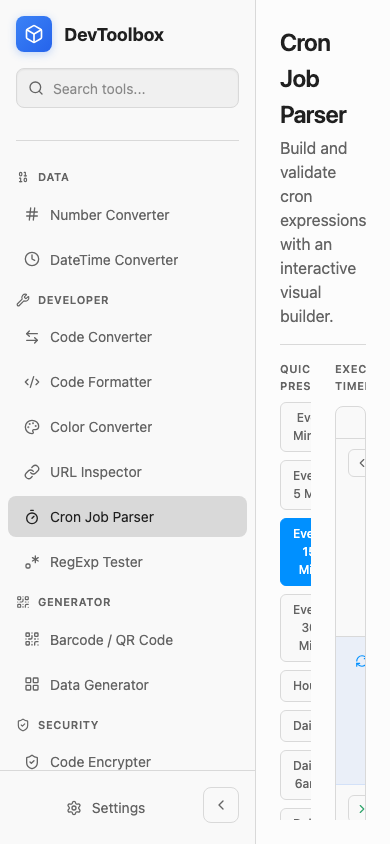
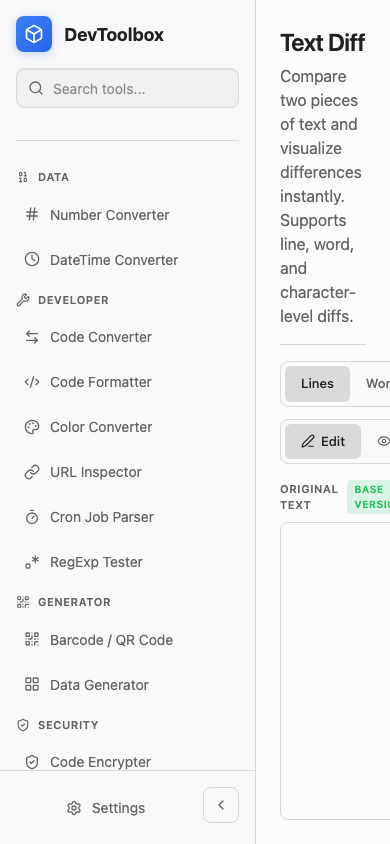
At narrow/mobile-sized widths, the app keeps the full sidebar visible and most tool surfaces continue using desktop-sized horizontal controls/panes. This pushes primary controls and editors off the right side of the viewport, making tools difficult or impossible to use in a small desktop window.
Affected tools
Confirmed in a 390x844 dark-mode Playwright pass across all current tools. The issue is most obvious on:
- Code Encoder
- Code Encrypter
- Hash Generator
- Code Converter
- Text Utilities
- Color Converter
- URL Inspector
- Cron Job Parser
- RegExp Tester
- Text Diff
Likely root UI area: global layout/sidebar plus shared tool controls/split panes.
Repro steps
- Start the frontend:
cd frontend && npm run dev -- --host 127.0.0.1 --port 3000. - Open any tool route, for example
/tool/url-inspector. - Resize viewport/window to approximately
390x844. - Enable dark mode.
- Observe that the sidebar remains full width and the tool content starts around x=280, with controls extending beyond the visible 390px viewport.
Expected
At narrow widths, the app should collapse or overlay the sidebar and stack tool controls/panes so the active tool remains usable without hidden primary controls.
Actual
Primary controls render off-screen. Example measurements from the monkey pass:
- URL Inspector: scheme/host/path inputs render from x=280 to x=440; query value input x=425 to x=585; action buttons x=593+.
- Color Converter: header actions and color formats table extend to x=606+ / x=650+.
- Cron Job Parser: field breakdown table extends to x=600+.
- Text Diff: mode/reset controls extend to x=531+.
Evidence
Generated screenshots during the run for each affected tool in dark mobile viewport. The run also recorded DOM bounding boxes showing off-screen controls.
Priority
Medium: desktop default width is usable, but this hurts small-window ergonomics and makes dark-mode/narrow-window testing miss important interaction paths.
Activity
vuon9 commentedon May 27, 2026
Evidence attached from the monkey pass:
URL Inspector, 390x844 dark viewport:
Color Converter, 390x844 dark viewport:
Cron Job Parser, 390x844 dark viewport:
Text Diff, 390x844 dark viewport:
Dedupe checked before filing against existing issues: #104, #64, #63, #62, #51, #50, #31, #28, #26, #25, #24, #4. No existing open issue covered the narrow-window/sidebar overflow problem.