Repository navigation
IOS publish #31507
Description
Activity
@luan-nvg This seems similar to Issue 31437. Were you able to make any progress on this?
@ luan-nvg Isso parece semelhante ao problema 31437 . Você conseguiu fazer algum progresso nisso?
@luan-nvg This seems similar to Issue 31437. Were you able to make any progress on this?
I still couldn't get friend, this error is giving in the newest version of the react to 64, and the craziest is that if I put it in version 0.63 it doesn't give this problem, however according to them on the ipad version 14.5.1 of the problem. this week I had to hire a person to emulate my project on an ipad compatible with what they asked for, and the same works as they are rejecting the informant that there is a blank screen. without totally ridiculous log shipping.
Reacted by Salman Zindani, jackwullems, mateoLorenzo1 and Hazem ElshaterReacted by jackwullemsI found out that at 0.63 I was accusing blank screen only in the approval of the Apple ad, in my Xcode it was marked in the option Archive as debugging in Product / Scheme / Edit Sheme / Archive / Build Configuration, change to a non-debuggable release so I was able to pass in Apple.
Since the topic I opened went to 0.64 with the error Non-public use of the API, the topic will remain open.
EDIT:
Resolved this issue by updating my archive scheme fromDebugtoReleaseCurrently experiencing the same issue. I was previously able to build and publish 0.64 but today I got the same error when attempting to publish beta to testflight.
react-native: 0.64.1
react-native-cli: 5.0.1
hermes: enabled
Method Names described in email (don't think all of these are RN, but some are):
_isKeyDown, _modifiedInput, _modifierFlags, determineAppInstallationAttributionWithCompletionHandler:, handleNotification:, identities, isPassthrough, lookupAdConversionDetails:, netServiceBrowser:didRemoveService:, onSuccess:, removeValuesForKeys:completion:, setCategoryID:, transform:, zipArchiveDidUnzipFileAtIndex:totalFiles:archivePath:unzippedFilePath:, zipArchiveProgressEvent:totalReacted by Edi Hasaj, gasolin, Nabs, bernatbombi, Jack Dewhurst, scorpbittechnologies2022, zarvedan, Michel A., Ahmet Buğra Kara, Kanad Godse and 5 moreReacted by linkplayer589 and AndreiOReacted by scorpbittechnologies2022, Ahmad Raza and linkplayer589@luan-nvg
I was able to resolve my issue by updating my archive scheme from Debug to ReleaseReacted by Jakub Boguski, scorpbittechnologies2022, Jeff Hughes, Max Harpunsky, Josue Mente, luan-nvg, Aditya Pujari, A.developer, jquartz, Andrew Duncan and 3 moreReacted by Tak-As, milobob, Ali Monam, Imam Azis, Kapil Avaiya, H.P.Leung, gibo77, Ganpat Lakhara and toryryReacted by scorpbittechnologies2022, Ahmad Raza, Zaid Haroon, A.developer and Naeem ur Rehman@luan-nvg
I was able to resolve my issue by updating my archive scheme from Debug to Releaseour this same resolution I applied before seeing this comment at 0.63 was having a problem with white screen without much information from apple. and rra just because it was debug in the scheme. as soon as possible I will test on 0.64
YourApp.xcscheme
   <ArchiveAction
-      buildConfiguration = "Debug"
+      buildConfiguration = "Release"
      revealArchiveInOrganizer = "YES">
   </ArchiveAction>
Reacted by Tejas G, Guilherme Marcel and Renaldhi FahreziReacted by milobob, Hossam Bhi Pasha, Dino , Bohachevskyy, Imam Azis, Kapil Avaiya, Iamivan1996, takanori hirai, Rhys Williams, H.P.Leung and 7 moreReacted by Hazem ElshaterReacted by Tak-AsReacted by luan-nvgReacted by Edi HasajAny solution on this?
Because I want to publish a test ipa on TestFlight with debug env. If I put scheme from Debug to Release, react-native-config will auto takeReleasevalue.Reacted by Samuel Scheit and Ray R.we're in same boat here, we need to publish our debug build to TestFlight for internal testing before release. this is blocking us from uploading to TestFlight. this was never an issue before.
Reacted by Daniel Grossfeld, Tamlyn Rhodes and Samuel ScheitNavigate to ios/yourAppName.xcodeproj/xcshareddata/xcschemes/yourAppName.xcscheme and replace every instance of "Debug" with "Release"
Hey all, any chance this issue is resolved without putting the whole project into release mode? Looks like I find myself in the same group using TestFlight...
Upgraded to react-native 0.66.0 and got this issue.
We need to publish our debug build to TestFlight for internal testing before release. this is blocking us from uploading to TestFlight.Hey @arinjay, I found you can still upload to testflight in release mode as described by others above, but it will also get checked by apple as I understand. Since I am very inexperienced with the apple store, I am not sure what the impact of that will be and how setting the archive from "debug" to "release" really changes the version itself. Maybe somebody can shed a light?
uploading the app in release mode devoids us from opening the dev menu on apps downloaded from test flight.
Is there any method to override the dev menu to enable in release mode?Reacted by SakeFabi and toryry100 remaining items
same issue GG
Reacted by YaroslavI am still getting this error
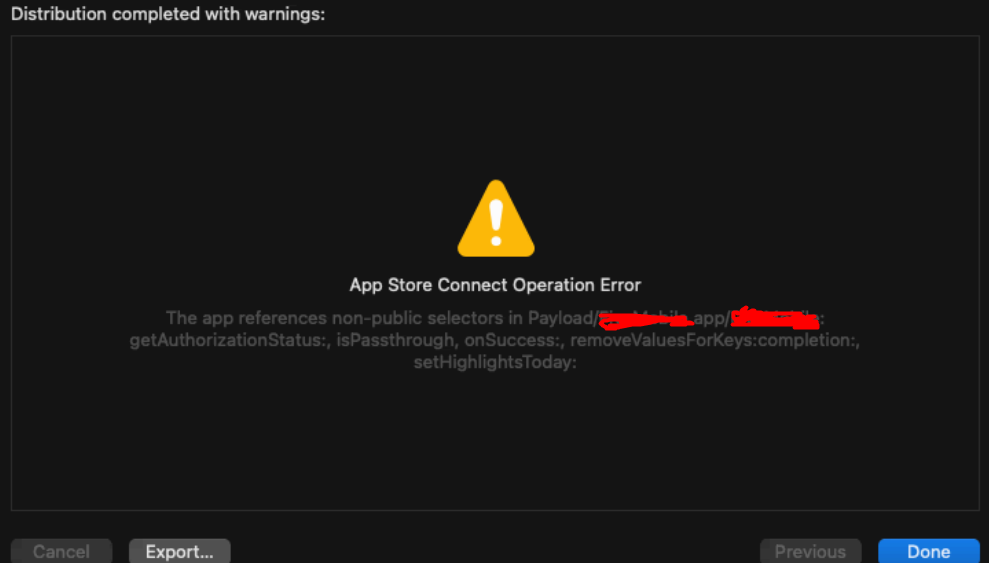 Reacted by Artem Sinelnikov, Tin Cya, Alec Lorraine, Frontend_Danylo_I, OOZE IT SOLUTIONS PVT. LTD., Rajneesh Biswal, Yaroslav and Imam AzisReacted by Yaroslav
ITMS-90338: Non-public API usage - The app references non-public selectors in: _isKeyDown, _modifiedInput, _modifierFlags. If method names in your source code match the private Apple APIs listed above, altering your method names will help prevent this app from being flagged in future submissions. In addition, note that one or more of the above APIs may be located in a static library that was included with your app. If so, they must be removed. For further information, visit the Technical Support Information at http://developer.apple.com/support/technical/
same issue
Reacted by YaroslavReacted by YaroslavSame warning here.
The app references non-public selectors in Payload/ProjectApp.app/ProjectApp: getAuthorizationStatus:, isPassthrough, onSuccess:, removeValuesForKeys:completion
The Minimum Development already to 11.0
buildConfiguration set to "Release"
No Flipper enabledReact 0.68.5
Xcode 14.3Reacted by Yaroslav and sanoofrahiman960Reacted by Yaroslav and Andrey FedorovichSame error here
 Reacted by Yaroslav
same gg
Same problem
Same problem here.
"react-native": "0.71.10",
xcode 14.3.1Solved this by writing following post install script. uploaded app on Testflight in debug mode post making these changes and it got approved by Apple ✌️.
post_install do |installer|
        find_and_replace("./node_modules/react-native/React/Base/RCTKeyCommands.m",
                                "_modifierFlags",
                                "_modifierEventFlags")
        find_and_replace("./node_modules/react-native/React/Base/RCTKeyCommands.m",
                                "_modifiedInput",
                                "_modifiedEventInput")
        find_and_replace("./node_modules/react-native/React/Base/RCTKeyCommands.m",
                                "_isKeyDown",
                                "_isKeyEventDown")
        find_and_replace("./node_modules/react-native/React/DevSupport/RCTPackagerClient.h",
                                "handleNotification",
                                "handlePackageNotification")

        find_and_replace("./node_modules/react-native/React/DevSupport/RCTPackagerConnection.mm",
                                "handleNotification",
                                "handlePackageNotification")
    end
definition of find_and_replace
def find_and_replace(dir, findstr, replacestr)
  Dir[dir].each do |name|
      text = File.read(name)
      replace = text.gsub(findstr,replacestr)
      if text != replace
          puts "Fix: " + name
          File.open(name, "w") { |file| file.puts replace }
          STDOUT.flush
      end
  end
  Dir[dir + '*/'].each(&method(:find_and_replace))
end
I used this code in my Podfile. When I run command
pod installI get an error:
[!] InvalidPodfilefile: [!] Specifying multiplepost_installhooks is unsupportedI used this code in my Podfile. When I run command
pod installI get an error: [!] InvalidPodfilefile: [!] Specifying multiplepost_installhooks is unsupported@AndriyFedorovich As the error says, you already have a
post_installblock in your Podfile from the base RN install. Just move thefind_and_replacelines from this tip into the one you had.```diff buildConfiguration
YourApp.xcscheme
   <ArchiveAction
-      buildConfiguration = "Debug"
+      buildConfiguration = "Release"
      revealArchiveInOrganizer = "YES">
   </ArchiveAction>
im using expo sdk 50, after 2 days searching answers to solve this bug and finally found the solution!!!
in eas.json
build.production.ios.buildConfiguration: trueand upload my build succesfully
Solved this by writing following post install script. uploaded app on Testflight in debug mode post making these changes and it got approved by Apple ✌️.
post_install do |installer|
        find_and_replace("./node_modules/react-native/React/Base/RCTKeyCommands.m",
                                "_modifierFlags",
                                "_modifierEventFlags")
        find_and_replace("./node_modules/react-native/React/Base/RCTKeyCommands.m",
                                "_modifiedInput",
                                "_modifiedEventInput")
        find_and_replace("./node_modules/react-native/React/Base/RCTKeyCommands.m",
                                "_isKeyDown",
                                "_isKeyEventDown")
        find_and_replace("./node_modules/react-native/React/DevSupport/RCTPackagerClient.h",
                                "handleNotification",
                                "handlePackageNotification")

        find_and_replace("./node_modules/react-native/React/DevSupport/RCTPackagerConnection.mm",
                                "handleNotification",
                                "handlePackageNotification")
    end
definition of find_and_replace
def find_and_replace(dir, findstr, replacestr)
  Dir[dir].each do |name|
      text = File.read(name)
      replace = text.gsub(findstr,replacestr)
      if text != replace
          puts "Fix: " + name
          File.open(name, "w") { |file| file.puts replace }
          STDOUT.flush
      end
  end
  Dir[dir + '*/'].each(&method(:find_and_replace))
end
For me it didn't work because of the relative paths starting with
./node_modules. (nothing was triggered)However, I changed the paths to start with
../node_modules(notice the double dot indicating parent directory instead of current directory) and it worked (matched with "Fix: ..." output).I've yet to try if Apple accepts though.
Thanks it works.
Reacted by dkumar-carfax and Muhammad YasirSolved this by writing following post install script. uploaded app on Testflight in debug mode post making these changes and it got approved by Apple ✌️.
post_install do |installer|
        find_and_replace("./node_modules/react-native/React/Base/RCTKeyCommands.m",
                                "_modifierFlags",
                                "_modifierEventFlags")
        find_and_replace("./node_modules/react-native/React/Base/RCTKeyCommands.m",
                                "_modifiedInput",
                                "_modifiedEventInput")
        find_and_replace("./node_modules/react-native/React/Base/RCTKeyCommands.m",
                                "_isKeyDown",
                                "_isKeyEventDown")
        find_and_replace("./node_modules/react-native/React/DevSupport/RCTPackagerClient.h",
                                "handleNotification",
                                "handlePackageNotification")

        find_and_replace("./node_modules/react-native/React/DevSupport/RCTPackagerConnection.mm",
                                "handleNotification",
                                "handlePackageNotification")
    end
definition of find_and_replace
def find_and_replace(dir, findstr, replacestr)
  Dir[dir].each do |name|
      text = File.read(name)
      replace = text.gsub(findstr,replacestr)
      if text != replace
          puts "Fix: " + name
          File.open(name, "w") { |file| file.puts replace }
          STDOUT.flush
      end
  end
  Dir[dir + '*/'].each(&method(:find_and_replace))
end
I used this code in my Podfile. When I run command
pod installI get an error: [!] InvalidPodfilefile: [!] Specifying multiplepost_installhooks is unsupportedgetting same error how did you resolved it
@kavya-shree-s try running this command
sudo gem install cocoapods-user-defined-build-types
I use hybrid app setup (swift + react native), in case you node_module are present in different location. do check the path i ./node_modules/ (can try with ../node_modules/..)


react-native-cli: 2.0.1
react-native: 0.64.1
error when trying to publish to Apple Store
Dear Developer,
We identified one or more issues with a recent delivery for your app, "App" 1.0 (7). Please correct the following issues, then upload again.
ITMS-90338: Non-public API usage - The app references non-public selectors in app: _isKeyDown, _modifiedInput, _modifierFlags, handleNotification:, isPassthrough, onSuccess:, removeValuesForKeys:completion:, setCategoryID:. If method names in your source code match the private Apple APIs listed above, altering your method names will help prevent this app from being flagged in future submissions. In addition, note that one or more of the above APIs may be located in a static library that was included with your app. If so, they must be removed. For further information, visit the Technical Support Information at http://developer.apple.com/support/technical/
Best regards,
The App Store Team