This repository was archived by the owner on Jan 8, 2024. It is now read-only.
Repository navigation
This repository was archived by the owner on Jan 8, 2024. It is now read-only.
Cannot register yubikey #540
Description

Steps to reproduce
Deployed nextcloud through docker (using version 16.0.4) and a postgres 10. nginx is setup to serve nextcloud with valid ssl cert on a public domain name.
Installed the two factor u2f app
The yubi key works correctly with github, I tested under firefox 69 and chromium (with no extension)
The install is as fresh as it can be.
Expected behaviour
Clicking on "add u2f device" should let me register my key
Actual behaviour
Spinning and an error is logged
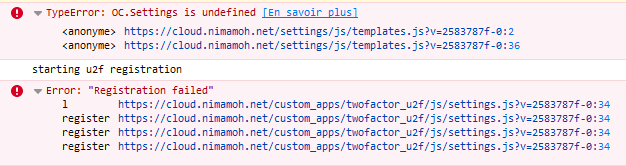
Activity
Nimamoh commentedon Sep 22, 2019
Okay, that was a configuration problem.
I had a default
http://localhostasoverwrite.cli.urlin theconfig.php(probably a default value setup by the installer), changing it to the actual domain fixed the issue.Maybe a more explicit error message would be nice (I don't really know if that's realistic, just an idea)
theorangepotato commentedon Oct 7, 2019
I have also experienced this problem. While my

overwrite.cli.urlvalue was set to an old URL, it is now set properly. I have since restarted my server and reinstalled this app, but neither had an effect. My errors look like this:This occurs for me in both Firefox and Chromium. I have confirmed that my key works with other sites, so I believe it is Nextcloud that is the issue. Does anyone have any ideas?
ChristophWurst commentedon Oct 9, 2019
Does it fully match the URL you use to access your instance?
ChristophWurst commentedon Oct 9, 2019
do you use https?
ChristophWurst commentedon Oct 9, 2019
Is it the first key you're trying to add?
theorangepotato commentedon Oct 9, 2019
Yes. The URL matches exactly. Would trailing slashes matter?
Yes, I use public facing HTTPS certificates from Let's Encrypt, nothing is self-signed.
Yes, this is the first U2F key I am trying to add to my account (actually, the first for my server ever).
Hopefully this helps!
ChristophWurst commentedon Oct 22, 2019
Thanks for the info. Unfortunately I'm still clueless.
tarioch commentedon Nov 8, 2019
I'm also not able to register it, getting the following error in the console
I'm using the docker image behind a reverse proxy which also does ssl termination. overwrite.cli.url is set to the "final" external url with https.
ChristophWurst commentedon Nov 21, 2019
@tarioch fix your webserver config to server .js.map files, then we get the actual stack trace with line number of the source files.
tarioch commentedon Nov 21, 2019
Will have to look into the docker image, not sure what needs to be configured there for this to work.
tarioch commentedon Nov 21, 2019
any hint where the js.map files should get served?
tarioch commentedon Nov 23, 2019
Figured out how to enable the map files, was a simple missing map in the rewrite rules in .htaccess. The error is
1 remaining item
theorangepotato commentedon Dec 22, 2019
I have done some investigation, and I am not sure if this is relevant or not, but I figured I would mention it. When I dive into the JS running with developer tools, I find that in the error occurs in the register function, wherein the
reqobject that is passed in has three attributes:Notice that the
appIdbeing passed is being passed as anhttp://domain, not anhttps://domain, despite the fact that my site is protected by Let's Encrypt. I know that both Firefox and Chrome will refuse to handle U2F keys if the domain is not protected by HTTPS, could this be the problem?And, to help with triaging, my Nextcloud instance is running behind a reverse proxy, like many of the other posters here. This may be relevant to why the
appIdis being passed as an HTTP version? However, myoverwrite.cli.urlis set to use HTTPS and my reverse proxy is listed undertrusted_proxies.I am not very familiar with this code base, so I apologize if this is irrelevant information, or if there is an obvious next step in debugging that I have not taken.
markmcb commentedon Dec 22, 2019
I can confirm the http observation of @theorangepotato ... shouldn't the app be referencing the overwrite.cli.url setting? Or is there some other setting to tell it to use https?
theorangepotato commentedon Dec 28, 2019
Okay, I now believe that this line is the culprit. As you can see, it just prepends the server protocol to the server host name, and this is the value that gets propagated to the
reqobject I identified above. This would result in it usinghttp://, since my server is behind a reverse proxy.I have looked through the App Development documentation, but I could not find a comprehensive list of APIs, so I don't know how to get the
overwrite.cli.urlvalue from an app. In the server you can get it from the SystemConfig object, but this API appears to be private.I am away from my server currently, but I will try to verify that changing the value returned in the first link fixes the issue in my personal set up. If it does, and someone can explain how to access the
overwrite.cli.urlfrom an app, I will be happy to submit a PR.theorangepotato commentedon Dec 31, 2019
I have confirmed that this is my issue. When I replace the offending line with the same string as my
overwrite.cli.url, this app works flawlessly. I can add a key, name it, and use it to authenticate. So, for anyone who is still experiencing this issue, you can try this to see if it fixes it (and let us know if it does!).1In terms of potential fixes, I think the cleanest solution would be to use the
overwrite.cli.url, though I do not know how much of a refactor that is in the core (like I said, I am not very familiar with this code base). Alternatively, it seems that$this->request->getServerHost()did return the correct hostname for me. So, another option is to hard code in'https://', given that U2F is useless without it. I do not know what that error would look like on an HTTP server, but hopefully some reasonable error UI could be implemented.1: The file can be found at
$NEXTCLOUD/apps/twofactor_u2f/lib/Service/U2FManager.php.ChristophWurst commentedon Jan 7, 2020
Got it. You didn't set
overwriteprotocol, did you? https://docs.nextcloud.com/server/stable/admin_manual/configuration_server/reverse_proxy_configuration.html#overwrite-parameters That prop is taken into account for the U2F appId. Set it tohttpsand registration will work :)ChristophWurst commentedon Jan 7, 2020
nextcloud/server#13116 if your problems started with Nextcloud 16 and you didn't configure your proxy as trusted.
markmcb commentedon Jan 19, 2020
@ChristophWurst this persists for me. I have x-forwarded-for set, and the trust_proxies config in config.php. Either I've got something set up wrong, or this issue is not closed.
theorangepotato commentedon Jan 19, 2020
Do you also have a line that says
'overwriteprotocol' => 'https',in yourconfig.php? That's what did it for me after I had mytrusted_proxiesset up properly. This allows Nextcloud to know what protocol to use (eitherhttporhttps) given that it's behind a reverse proxy and does not have access to that information.markmcb commentedon Jan 19, 2020
@theorangepotato yes, I've got that in my config.php. I'm at a loss for what my issue could be.
theorangepotato commentedon Jan 19, 2020
@markmcb With the new PR, it should warn you in the console if you try to use U2F and it sees
httpas your protocol. Does this show up for you? Have you confirmed if you go through the Developer Tools that thereqobject is still usinghttp? Have you tried my initial workaround, and does it work for you?Because, if you can force it to use
httpsand you still get this error, then you are probably experiencing a different bug altogether.markmcb commentedon Jan 19, 2020
In the console I see this:
The source of the first is definitely https related:
Overriding the line in
U2FManager.phpdoesn't seem to help either:And for completeness, relevant lines from
config.phpand my nginx config:ChristophWurst commentedon Jan 20, 2020
Please file a new ticket with this info.
gspe commentedon Jan 28, 2020
This is the solution for me too. Thanks
daisukixci commentedon Feb 8, 2020
same as gspe, this worked for me as well. Thanks for your help/work