Repository navigation
Set user status automatically (based on e.g. being in a call or events) #27990

Description

Status can automatically change depending on what event is happening
- Call started
- Event matching specific criteria
- ... ?
To be discussed:
- Setting page for this feature:
- Should this be configurable ?
- What can be enabled/disabled ?
Reacted by Kai, Danny Schapeit and Danir Toma
Activity
[-]Auto status[/-][+]Set status automatically[/+]ChristophWurst commentedon Aug 10, 2021
It's simple. Any event in a calendar that is not transparent and where the status is set to busy. Sabre and free/busy will do this. We don't need to define our own logic for this.
This idea is also tracked at https://github.com/orgs/nextcloud/projects/50#card-62761809.
jancborchardt commentedon Aug 10, 2021
Design spec based on a call with @CarlSchwan and @nimisha-vijay
Questions & clarifications
[-]Set status automatically[/-][+]Set user status automatically (based on e.g. being in a call or events)[/+]ChristophWurst commentedon Aug 11, 2021
What I had in mind was an option to let the user select their preferred status and status text for busy events. Some people might prefer DND, others only want Away to signal that people still can send them a chat message.
IMO this is a hard requirement. Technically there could be your default status (the one we use now) and a call/meeting just overrides that status. When the call/meeting ends the original status is shown again. Just an idea.
jancborchardt commentedon Aug 11, 2021
@ChristophWurst right, good point on the "reset to previous status", moved it up in the list.
Regarding the "preferred status" setting, is this something which you know from other solutions? (And if we would have a setting like that I assume the place to put it would be the app itself, in this case Calendar?)
ChristophWurst commentedon Aug 11, 2021
Nope, this is just how I imagined this could work.
Nevertheless I found https://support.microsoft.com/en-us/office/change-your-status-in-teams-ce36ed14-6bc9-4775-a33e-6629ba4ff78e
Which is interesting. You could possibly derive the info about whether the current busy event is a meeting or an ordinary event based on whether there are participants. But then again meeting is very specific. Maybe I'm meeting a friend in the park and invite them. That's not a meeting. 🤷
CarlSchwan commentedon Aug 12, 2021
Some small MRs implementing the feature for Talk:
nickvergessen commentedon Aug 13, 2021
This is fatal to Nextclouds notification system. For me it would mean that I mostly never get any push or browser notifications anymore. I guess it's similar on Teams which is why Busy sounds more logical.
Also what if the meeting/call is secret?
Pilzinsel64 commentedon Nov 25, 2021
As I know from Teams and Skype for Business you can't really change "In Call" status before. But you can set how you are available in a meeting in the Calendar. See here in Outlook:
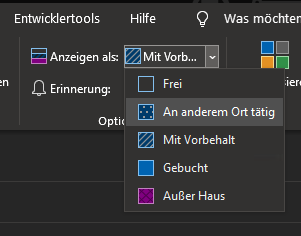
"Frei" and "An anderem Ort tätig" basically don't change your status for the time of the event.
"Mit Vorbehalt" and "Gebucht" sets your status to "Busy.
"Außer Haus" sets your status to "Away" to signal that you are not at work or on the PC and not available.
And that's why I also would suggest is to add one more Status "Busy" that basically is like "Online" but red and another text. You still get notifications there, like on "Online" and "Away" or "Offline".
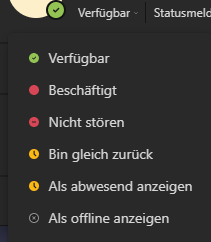
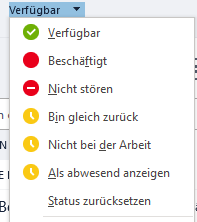
But also keep "Do not disturb"/"Nicht stören" where you don't get any notifications, how it is already in.
See how it is in Skype for Business and Teams:
And that additional "Busy" status you could use for Calender Events and Talk Calls. That's how you are shown as busy but not as away and still get notifications.