Skip to content

Acrylic Blur WPF Flickers on Resizing #66

Open

Description

@tricky-mind

I have recreated the example Acrylic Effect in WPF and made it to fit the entire window. But when i resize the window it flickers a lot and also a kind on lagging in resizing.

i have added a preview of my issue here
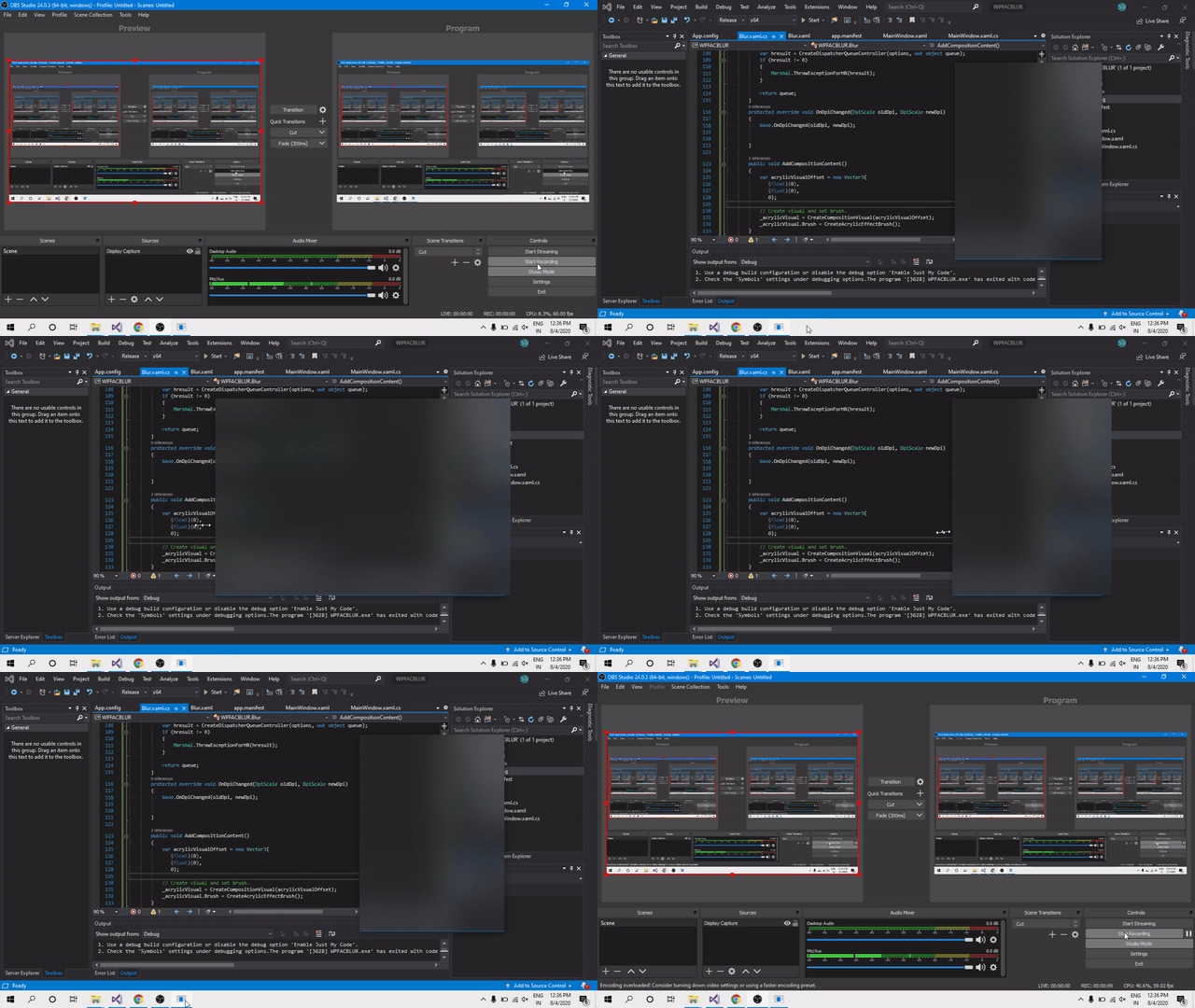
Click here to see the preview

Just notice the starting of the gif.

is there any way to fix it.i have noticed similar behavior while creating ACRYLIC_BLUR_BEHIND using setWindowCompositionAttribute() Microsoft Open Source (@microsoftopensource)

Note: The Window that i use Currently use without the Acrylic blur does not flicker

Activity

  1. VS-ux commented on Aug 13, 2020

    @VS-ux

    tricky-mind
    It seems this issue is not specific to acrlic effect. I have Winforms app with custom title bar and I resize via WM_NCLBUTTONDOWN. It also has this exact flickering issue.

    Editors like VS-Code also have this issue.

  2. VS-ux commented on Aug 13, 2020

    @VS-ux

    tricky-mind Also, just a question, how did you get the acrylic to fit the entire window?

  3. tricky-mind commented on Aug 13, 2020

    @tricky-mind
    Author

    tricky-mind
    It seems this issue is not specific to acrlic effect. I have Winforms app with custom title bar and I resize via WM_NCLBUTTONDOWN. It also has this exact flickering issue.

    Editors like VS-Code also have this issue.

    The Flickering problem in my window is not caused by the form, it is caused by the acrylic layer. My Custom Chrome Window doesn't flicker at all (i fixed the Window Flickering issue).

    Just have a look at my Custom Control Library: UWPHost

    it wont flicker.

  4. tricky-mind commented on Aug 13, 2020

    @tricky-mind
    Author

    tricky-mind Also, just a question, how did you get the acrylic to fit the entire window?

    I Figured out a way to apply the effects directly to window instead of using a HWND Host.

    Here is the full code:

    using Microsoft.Graphics.Canvas;
    using Microsoft.Graphics.Canvas.Effects;
    using Microsoft.Graphics.Canvas.UI.Composition;
    using System;
    using System.Numerics;
    using System.Runtime.InteropServices;
    using System.Windows;
    using System.Windows.Controls;
    using System.Windows.Interop;
    using Windows.Graphics.DirectX;
    using Windows.Graphics.Effects;
    using Windows.Storage;
    using Windows.UI;
    using Windows.UI.Composition;
    using WindowsMedia = System.Windows.Media;
    
    namespace WPFACBLUR
    {
        /// <summary>
        /// Interaction logic for MainWindow.xaml
        /// </summary>
        public partial class MainWindow : Window
        {
    
            private readonly CanvasDevice _canvasDevice;
            private readonly IGraphicsEffect _acrylicEffect;
            private readonly Compositor _compositor;
            private readonly ContainerVisual _containerVisual;
            private readonly ICompositorDesktopInterop _compositorDesktopInterop;
            private static double _rectWidth;
            private static double _rectHeight;
            private static bool _isAcrylicVisible = false;
            private static SpriteVisual _acrylicVisual;
            private static DpiScale _currentDpi;
            private static CompositionGraphicsDevice _compositionGraphicsDevice;
            private static CompositionSurfaceBrush _noiseSurfaceBrush;
            private IntPtr hwnd;
            private readonly object _dispatcherQueue;
            private object target;
            private ICompositionTarget _compositionTarget;
    
            public MainWindow()
            {
                InitializeComponent();
                // Get graphics device.
                _canvasDevice = CanvasDevice.GetSharedDevice();
                _dispatcherQueue = InitializeCoreDispatcher();
                _compositor = new Compositor();
                _compositorDesktopInterop = (ICompositorDesktopInterop)(object)_compositor;
                // Create host and attach root container for hosted tree.
                // _compositionHost = new CompositionHost();
                //  CompositionHostElement.Child = _compositionHost;
    
               
                _containerVisual = _compositor.CreateContainerVisual();
    
                // Create effect graph.
                _acrylicEffect = CreateAcrylicEffectGraph();
            }
            public void SetChild(Visual v)
            {
                _compositionTarget.Root = v;
            }
            private void Window_Loaded(object sender, RoutedEventArgs e)
            {
    
                var interopWindow = new WindowInteropHelper(this);
                hwnd = interopWindow.Handle;
    
                var presentationSource = PresentationSource.FromVisual(this);
                double dpiX = 1.0;
                double dpiY = 1.0;
                if (presentationSource != null)
                {
                    dpiX = presentationSource.CompositionTarget.TransformToDevice.M11;
                    dpiY = presentationSource.CompositionTarget.TransformToDevice.M22;
                }


                // Create a target for the window.
                _compositorDesktopInterop.CreateDesktopWindowTarget(hwnd, true,out _compositionTarget);
               
               
                _currentDpi = WindowsMedia.VisualTreeHelper.GetDpi(this);
    
                _rectWidth = this.ActualWidth;
                _rectHeight = this.ActualHeight;
    
                // Get graphics device.
                _compositionGraphicsDevice = CanvasComposition.CreateCompositionGraphicsDevice(_compositor, _canvasDevice);
    
                // Create surface. 
                var noiseDrawingSurface = _compositionGraphicsDevice.CreateDrawingSurface(
                    new Windows.Foundation.Size(_rectWidth, _rectHeight),
                    DirectXPixelFormat.B8G8R8A8UIntNormalized,
                    DirectXAlphaMode.Premultiplied);
    
                // Draw to surface and create surface brush.
                var noiseFilePath = AppDomain.CurrentDomain.BaseDirectory + "Assets\\NoiseAsset_256X256.png";
                LoadSurface(noiseDrawingSurface, noiseFilePath);
                _noiseSurfaceBrush = _compositor.CreateSurfaceBrush(noiseDrawingSurface);
                _compositionTarget.Root = _containerVisual;
                // Add composition content to tree.
                AddCompositionContent();
    
                ToggleAcrylic();
            }
    
            private object InitializeCoreDispatcher()
            {
                DispatcherQueueOptions options = new DispatcherQueueOptions
                {
                    apartmentType = DISPATCHERQUEUE_THREAD_APARTMENTTYPE.DQTAT_COM_STA,
                    threadType = DISPATCHERQUEUE_THREAD_TYPE.DQTYPE_THREAD_CURRENT,
                    dwSize = Marshal.SizeOf(typeof(DispatcherQueueOptions))
                };
    
                var hresult = CreateDispatcherQueueController(options, out object queue);
                if (hresult != 0)
                {
                    Marshal.ThrowExceptionForHR(hresult);
                }
    
                return queue;
            }
            protected override void OnDpiChanged(DpiScale oldDpi, DpiScale newDpi)
            {
                base.OnDpiChanged(oldDpi, newDpi);
                _currentDpi = newDpi;
                Vector3 newScale = new Vector3((float)newDpi.DpiScaleX, (float)newDpi.DpiScaleY, 1);
    
                // Adjust each child visual scale and offset.
                foreach (SpriteVisual child in _containerVisual.Children)
                {
                    child.Scale = newScale;
                    var newOffsetX = child.Offset.X * ((float)newDpi.DpiScaleX / (float)oldDpi.DpiScaleX);
                    var newOffsetY = child.Offset.Y * ((float)newDpi.DpiScaleY / (float)oldDpi.DpiScaleY);
                    child.Offset = new Vector3(0, 0, 0);
                }
            }
    
            public void AddCompositionContent()
            {
                var acrylicVisualOffset = new Vector3(
                    (float)(0),
                    (float)(0),
                    0);
    
                // Create visual and set brush.
                _acrylicVisual = CreateCompositionVisual(acrylicVisualOffset);
                _acrylicVisual.Brush = CreateAcrylicEffectBrush();
            }
    
            SpriteVisual CreateCompositionVisual(Vector3 offset)
            {
                var visual = _compositor.CreateSpriteVisual();
                visual.Size = new Vector2((float)_rectWidth, (float)_rectHeight);
                visual.Scale = new Vector3((float)_currentDpi.DpiScaleX, (float)_currentDpi.DpiScaleY, 1);
                visual.Offset = offset;
    
                return visual;
            }
    
            async void LoadSurface(CompositionDrawingSurface surface, string path)
            {
                // Load from stream.
                var storageFile = await StorageFile.GetFileFromPathAsync(path);
                var stream = await storageFile.OpenAsync(FileAccessMode.Read);
                var bitmap = await CanvasBitmap.LoadAsync(_canvasDevice, stream);
    
                // Draw to surface.
                using (var ds = CanvasComposition.CreateDrawingSession(surface))
                {
                    ds.Clear(Colors.Transparent);
    
                    var rect = new Windows.Foundation.Rect(0, 0, _rectWidth, _rectHeight);
                    ds.DrawImage(bitmap, 0, 0, rect);
                }
    
                stream.Dispose();
                bitmap.Dispose();
            }
    
            IGraphicsEffect CreateAcrylicEffectGraph()
            {
                return new BlendEffect
                {
                    Mode = BlendEffectMode.Overlay,
                    Background = new CompositeEffect
                    {
                        Mode = CanvasComposite.SourceOver,
                        Sources =
                                {
                                new BlendEffect
                                {
                                    Mode = BlendEffectMode.Exclusion,
                                    Background = new SaturationEffect
                                    {
                                        Saturation = 2,
                                        Source = new GaussianBlurEffect
                                        {
                                            Source = new CompositionEffectSourceParameter("Backdrop"),
                                            BorderMode = EffectBorderMode.Hard,
                                            BlurAmount = 30
                                        },
                                    },
                                    Foreground = new ColorSourceEffect()
                                    {
                                        Color = Color.FromArgb(05, 255, 255, 255)
                                    }
                                },
                                new ColorSourceEffect
                                {
                                    Color = Color.FromArgb(05, 255, 255, 255)
                                }
                            }
                    },
                    Foreground = new OpacityEffect
                    {
                        Opacity = 0.03f,
                        Source = new BorderEffect()
                        {
                            ExtendX = CanvasEdgeBehavior.Wrap,
                            ExtendY = CanvasEdgeBehavior.Wrap,
                            Source = new CompositionEffectSourceParameter("Noise")
                        },
                    },
                };
            }
    
            CompositionEffectBrush CreateAcrylicEffectBrush()
            {
                // Compile the effect.
                var effectFactory = _compositor.CreateEffectFactory(_acrylicEffect);
    
                // Create Brush.
                var acrylicEffectBrush = effectFactory.CreateBrush();
    
                // Set sources.
                var destinationBrush = _compositor.CreateBackdropBrush();
                acrylicEffectBrush.SetSourceParameter("Backdrop", destinationBrush);
                acrylicEffectBrush.SetSourceParameter("Noise", _noiseSurfaceBrush);
    
                return acrylicEffectBrush;
            }
    
            public void Dispose()
            {
                _acrylicVisual.Dispose();
                _noiseSurfaceBrush.Dispose();
    
                _canvasDevice.Dispose();
                _compositionGraphicsDevice.Dispose();
            }
    
            internal void ToggleAcrylic()
            {
                // Toggle visibility of acrylic visual by adding or removing from tree.
                if (_isAcrylicVisible)
                {
                    _containerVisual.Children.Remove(_acrylicVisual);
                }
                else
                {
                    _containerVisual.Children.InsertAtTop(_acrylicVisual);
                }
    
                _isAcrylicVisible = !_isAcrylicVisible;
            }
    
    
            internal enum DISPATCHERQUEUE_THREAD_APARTMENTTYPE
            {
                DQTAT_COM_NONE = 0,
                DQTAT_COM_ASTA = 1,
                DQTAT_COM_STA = 2
            };
    
            internal enum DISPATCHERQUEUE_THREAD_TYPE
            {
                DQTYPE_THREAD_DEDICATED = 1,
                DQTYPE_THREAD_CURRENT = 2,
            };
    
            [StructLayout(LayoutKind.Sequential)]
            internal struct DispatcherQueueOptions
            {
                public int dwSize;
    
                [MarshalAs(UnmanagedType.I4)]
                public DISPATCHERQUEUE_THREAD_TYPE threadType;
    
                [MarshalAs(UnmanagedType.I4)]
                public DISPATCHERQUEUE_THREAD_APARTMENTTYPE apartmentType;
            };
    
            [DllImport("coremessaging.dll")]
            internal static extern int CreateDispatcherQueueController(DispatcherQueueOptions options,
                                                    [MarshalAs(UnmanagedType.IUnknown)]
                                                   out object dispatcherQueueController);
        }
    
        [ComImport]
        [Guid("29E691FA-4567-4DCA-B319-D0F207EB6807")]
        [InterfaceType(ComInterfaceType.InterfaceIsIUnknown)]
        public interface ICompositorDesktopInterop
        {
            void CreateDesktopWindowTarget(IntPtr hwndTarget, bool isTopmost, out ICompositionTarget target);
        }
    
        [ComImport]
        [Guid("A1BEA8BA-D726-4663-8129-6B5E7927FFA6")]
        [InterfaceType(ComInterfaceType.InterfaceIsIInspectable)]
        public interface ICompositionTarget
        {
            Visual Root
            {
                get;
                set;
            }
        }
    }
    
    
  5. VS-ux commented on Aug 13, 2020

    @VS-ux

    tricky-mind

    tricky-mind
    It seems this issue is not specific to acrlic effect. I have Winforms app with custom title bar and I resize via WM_NCLBUTTONDOWN. It also has this exact flickering issue.
    Editors like VS-Code also have this issue.

    The Flickering problem in my window is not caused by the form, it is caused by the acrylic layer. My Custom Chrome Window doesn't flicker at all (i fixed the Window Flickering issue).

    Just have a look at my Custom Control Library: UWPHost

    it wont flicker.

    Hmm. Your right. But could you verify if it's only flickering from left-right and not right-left? Because your issue seems very similar to some resizing issues that VS-Code and my custom form have.

    Also, thanks for posting the code for your full window blur!

  6. tricky-mind commented on Aug 13, 2020

    @tricky-mind
    Author

    tricky-mind

    tricky-mind
    It seems this issue is not specific to acrlic effect. I have Winforms app with custom title bar and I resize via WM_NCLBUTTONDOWN. It also has this exact flickering issue.
    Editors like VS-Code also have this issue.

    The Flickering problem in my window is not caused by the form, it is caused by the acrylic layer. My Custom Chrome Window doesn't flicker at all (i fixed the Window Flickering issue).
    Just have a look at my Custom Control Library: UWPHost
    it wont flicker.

    Hmm. Your right. But could you verify if it's only flickering from left-right and not right-left? Because your issue seems very similar to some resizing issues that VS-Code and my custom form have.

    Also, thanks for posting the code for your full window blur!

    I am pretty sure it won't flicker from any side because I used a patch with the microsoft.windows.shell DLL to avoid flickering on resizing.
    Is there any way to get the backdrop brush of window through direct composition.
    Since this acrylic effect lags I'm trying to implement the acrylic effect through direct composition using

    IDCompositionDevice3

    I learned to apply the gaussian blur effect to my visual.
    But how will I apply the effect to my windows backdrop.

    In this sample they uses a method this code:

    CompositionBackdropBrush backdropBrush = _compositor.CreateBackdropBrush();

    To create the back drop brush. Is there any way that i could get this back drop visual through direct x , direct composition.

  7. VS-ux commented on Aug 13, 2020

    @VS-ux

    tricky-mind

    tricky-mind

    tricky-mind
    It seems this issue is not specific to acrlic effect. I have Winforms app with custom title bar and I resize via WM_NCLBUTTONDOWN. It also has this exact flickering issue.
    Editors like VS-Code also have this issue.

    The Flickering problem in my window is not caused by the form, it is caused by the acrylic layer. My Custom Chrome Window doesn't flicker at all (i fixed the Window Flickering issue).
    Just have a look at my Custom Control Library: UWPHost
    it wont flicker.

    Hmm. Your right. But could you verify if it's only flickering from left-right and not right-left? Because your issue seems very similar to some resizing issues that VS-Code and my custom form have.
    Also, thanks for posting the code for your full window blur!

    I am pretty sure it won't flicker from any side because I used a patch with the microsoft.windows.shell DLL to avoid flickering on resizing.
    Is there any way to get the backdrop brush of window through direct composition.
    Since this acrylic effect lags I'm trying to implement the acrylic effect through direct composition using

    IDCompositionDevice3

    I learned to apply the gaussian blur effect to my visual.
    But how will I apply the effect to my windows backdrop.

    In this sample they uses a method this code:

    CompositionBackdropBrush backdropBrush = _compositor.CreateBackdropBrush();

    To create the back drop brush. Is there any way that i could get this back drop visual through direct x , direct composition.

    I'm really sorry. I'm not sure at all how to get the back-drop through direct-x.
    This is really not my area of expertise, I just came from Winforms looking for a way to use window-blur.

  8. tricky-mind commented on Aug 13, 2020

    @tricky-mind
    Author

    No problem. Thankyou

  9. ShankarBUS commented on Sep 24, 2020

    @ShankarBUS

    Hey tricky-mind, how did you get the window acrylic effect (not in-app acrylic, which uses Compositor.CreateBackdropBrush()) only using Compositor.CreateBackdropBrush() it didn't work for me. I also tried Compositor.CreateHostBackdropBrush() but it paints the area black. Can you upload the source code to GitHub please?

  10. tricky-mind commented on Sep 24, 2020

    @tricky-mind
    Author

    Hello ShankarBUS, I have discontinued the project because i was not able to get my window backdrop brush. Any way i will share you all my resources with you. If you have any progress on it please let me know.

    I am attaching a zip file of code

    WPF Acrylic blur effect using Win2D

    Note:
    In this code the noise effect might be more blurred because i tried to resize the noise layer to window width. and there may be some piece of unwanted code also. In current versions of windows if you drag or resize the window it produces lag and flickering. In the above zip i have made the window allowTransparency="true" so the window is not resizable or draggable.

    Since the Acrylic effect lags,i was trying to achieve the same blur effect through DirectX but i was unable to get the backdrop for window. How ever i find a way to blur the window components through GaussianBlur by using DirectX. you may have a look at that too. (note : this one is written in C++)

    the code is in the file named DirectComNoCom1.zip

  11. tricky-mind commented on Sep 24, 2020

    @tricky-mind
    Author

    if you have any progress please let me know

  12. ShankarBUS commented on Sep 24, 2020

    @ShankarBUS

    tricky-mind Thanks for sharing your work 😁.

    if you have any progress please let me know

    Yes I will!

Sign up for free to join this conversation on GitHub. Already have an account? Sign in to comment

Metadata

Metadata

Assignees

No one assigned

    Labels

    No labels
    No labels

    Type

    No type

    Projects

    No projects

      Milestone

      No milestone

      Relationships

      None yet

      Development

      No branches or pull requests

      Issue actions