




Draw Entity Relationship Diagrams (ERD) with python and graphviz.
This code is built on top of the graphviz python package and provides methods to facilitate the declaration of blocks commonly used in ERD such as entities and attributes.
We can draw diagrams like
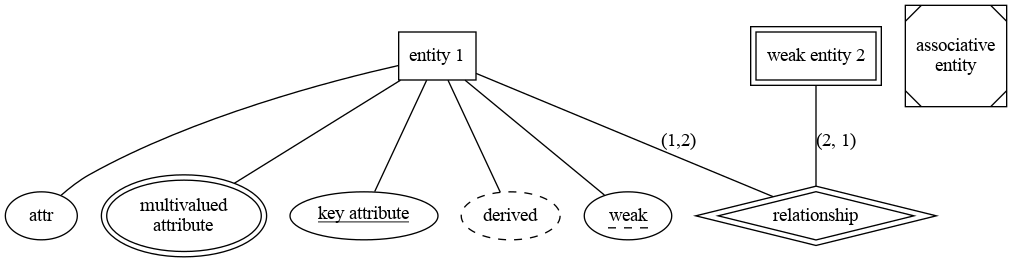
using the code:
    gr = graphviz.Graph("ER", filename="erd", engine="dot", format="png")
    obj = ERD(gr)

    # node name and node label
    obj.entity("entity1", "entity 1")
    # the label is optional as it is in graphviz
    obj.attribute("attr")
    # new lines using the html notation
    obj.multivalue("multi", "multivalued<BR/>attribute")
    obj.key("key", "key attribute")
    obj.derived("derived")
    obj.weak_key("weak")

    obj.associative_entity("assoc", "associative<BR/>entity")

    obj.weak_entity("entity2", "weak entity 2")

    # draw relation between entities
    obj.relation("relationship", "entity1", "entity2", "(1,2)", "(2, 1)", "yes")

    # connect the attributes
    obj.gr.edges(
        [
            ("entity1", "attr"),
            ("entity1", "multi"),
            ("entity1", "key"),
            ("entity1", "weak"),
            ("entity1", "derived"),
        ]
    )

    obj.gr.view()
The code was developed inside a virtual environment using git hooks. To facilitate the process, assuming a linux environment (Ubuntu), some recipes with makefile are available.
To install all the dependencies and to configure the git hooks:
make install
To build the documentation locally calling sphinx:
make docs
To access the generated documentation, open the file `docs/_build/index.html'.
To execute tests:
make tests
To build the python package:
make build