Repository navigation
Resident Set Size on Linux remains much higher than managed memory usage in .NET 5.0 #52592

Description

After upgrading our application, running on Ubuntu 18.04, from .NET Core 3.1 to .NET 5.0 we're seeing a consistently higher Resident Set Size memory usage.
The application normally processes web requests at a steady rate, but once per day it updates its data, which causes much higher RAM usage for 1-30 minutes. After this, we see the managed memory (as reported by GC.GetTotalMemory) drop about the same way on .NET 3.1 and 5.0. However, the Resident Set Size for the process either remains unchanged or drops gradually over the next few hours, but is still way higher than managed memory - we're talking ~6 GB reported by GC.GetTotalMemory and ~33 GB Resident Set Size.
To further confuse things, we had 3 instances of the application running at the same time on the same machine receiving the same requests. One on .NET 3.1, another on .NET 5.0 with otherwise identical code and another on .NET 5.0 with some code differences. The RSS dropped for the .NET 3.1 version and the identical .NET 5.0 version, but not the newer .NET 5 version, implying something about our code changes may have caused the difference, but I can't see what that can be when the managed memory went down the same way for all of them.
https://devblogs.microsoft.com/dotnet/performance-improvements-in-net-5/ mentions a number of GC changes in .NET 5, in particular #37894 which sounds relevant. Is there any documentation on how RSS is expected to behave in .NET 5? For example, when does the GC consider itself to be in a "low memory situation"? I was unable to find anything. Basically, what we're trying to figure out is whether this is a problem or expected behavior. If expected, the next question would then be how to tell how much RAM the server really has available to run more instances of the application.
Activity
mangod9 commentedon May 11, 2021
Adding @PeterSolMS as fyi. RSS is something handled by the OS and dont believe .net can influence how resident vs. swapped would be managed. Assume you dont see any other performance issues with the app (like throughput differences due to frequent GCs and such)?
emz00 commentedon May 11, 2021
It's not using any swap, so RSS is the "total" RAM usage, as far as I understand. No, we're not seeing any major performance differences (.NET 5.0 is just slightly faster).
Maoni0 commentedon May 12, 2021
are you using Server GC? in .NET 5 we moved the decommit at the end of ephemeral segment out of the GC pause so you would see resident pages gradually dropping, however it wouldn't be as long as hours. it should come down much more quickly than that unless you need the memory committed again. if you could collect a trace for these processes that'd be helpful.
high memory load is explained here.
@PeterSolMS it'd be helpful to have some instrumentation around the decommit since now we don't know how much we will be decommitting. perhaps at the beginning of the GC we could give some info how much we've decommitted so far?
emz00 commentedon May 12, 2021
We are using server GC. Thanks for the link, that's the kind of thing I was looking for! I will read it in more detail later, but I saw that "low memory situation" means 90-97% memory used. That was not the case on this machine (it has 512 GB RAM and no more than 75% of that was ever used), so sounds like maybe the GC didn't think it needed to bother to return RAM to the OS?
Here is the managed memory usage from last night:
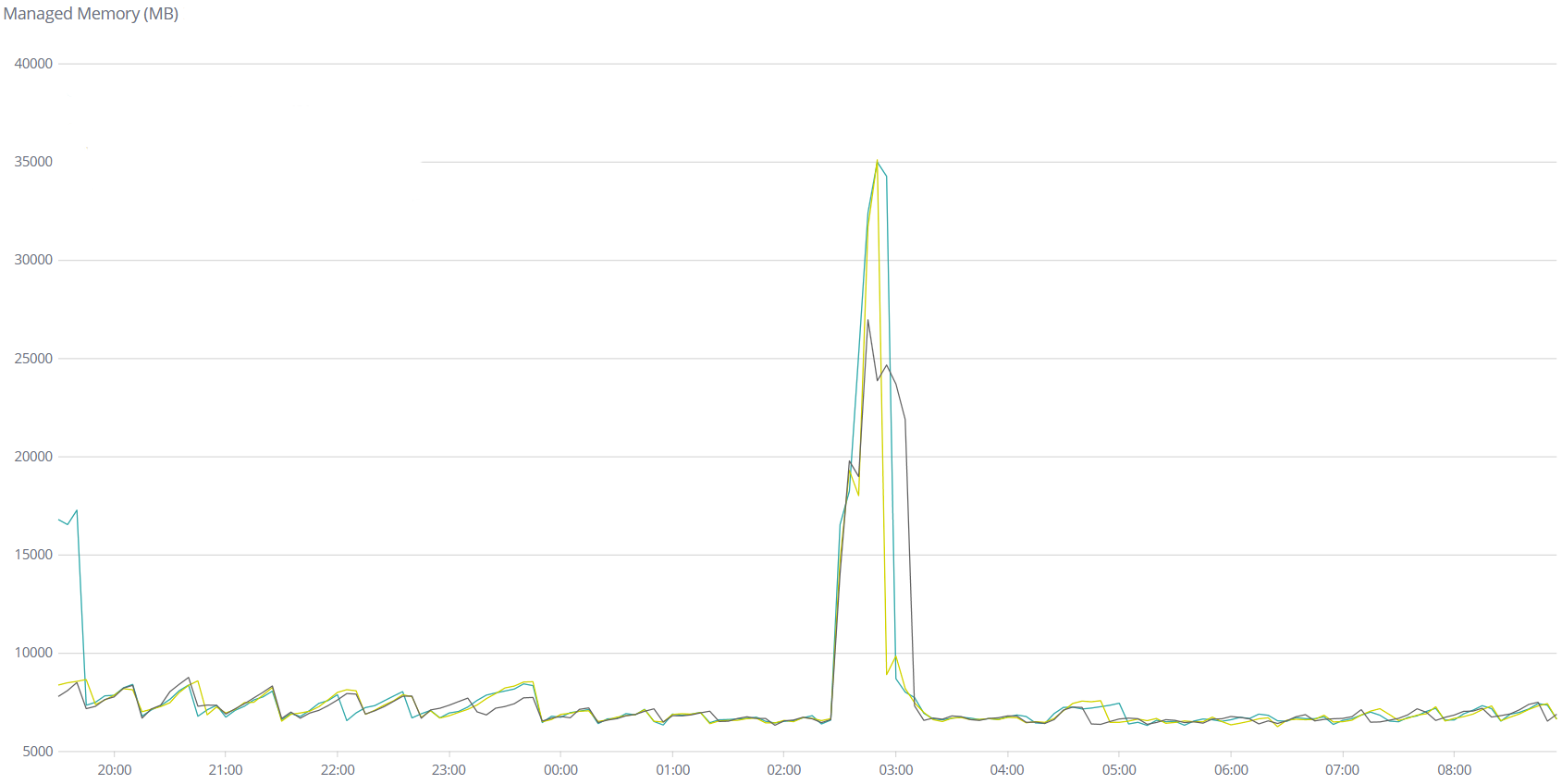
The yellow and black lines are both .NET 3.1 versions and the blue one is .NET 5 with code changes to our application. (Edit: the black one was supposed to be .NET 5.0 with otherwise identical code to the .NET 3.1 version, but it's not. I'll get back to you next week with data for both app versions on both runtime versions.)
Now, here is the sum of (VmRSS+VmSwap) over the same period:
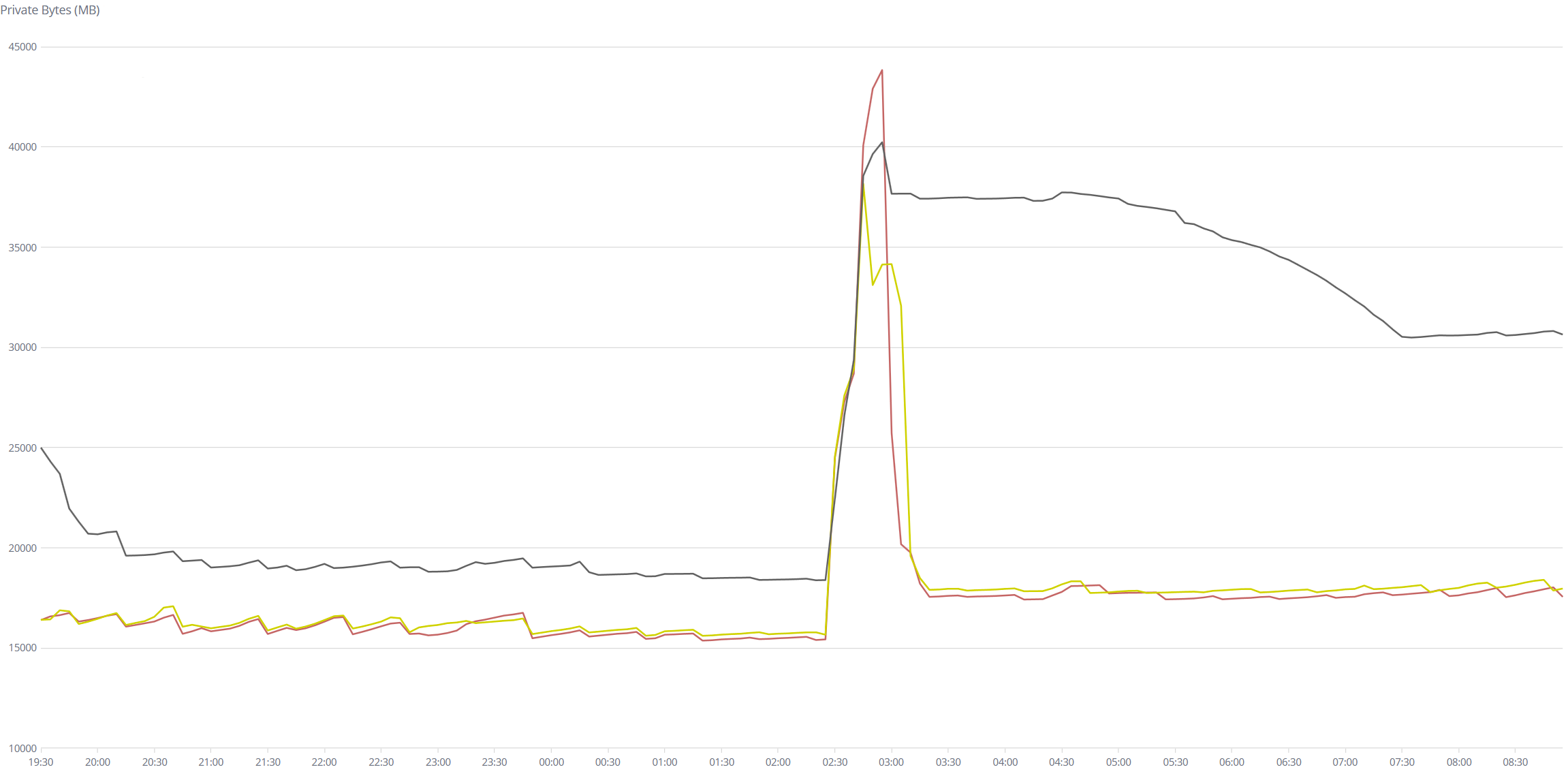
Here the red and yellow lines are .NET 3.1 and the black is .NET 5.0 with code changes. (Confusing that the colors are not the same, I know, but I can't control that, sorry!)
I'm not sure if I can get a trace - that would have have a high CPU or RAM overhead or use a lot of disk, right? Can it run with the tracing on for something like 12 hours?
mangod9 commentedon May 12, 2021
can you provide some details / pseudocode of your changes? Perhaps you could try reverting some which feel allocation/caching related and see if that has any effect? Thx.
emz00 commentedon May 17, 2021
I ran the test again over the last 4 days, this time with each version of our code (labelled v44 and v45 here) on both .NET 3.1 and 5.0. There is also an earlier version (v43 here), which is on .NET 3.1 only.
Again, the managed memory (GC.GetTotalMemory) is very similar between them:
VmRSS+VmSwap is markedly different between .NET 3.1 and 5.0 for otherwise identical code:
... but it seems to have gotten worse with each release of our code (v43->v44->v45) even on .NET 3.1. The spike occurs around 02:30 when we run a nightly scheduled task to reload some data and does not fully go down until 10:00-22:00, depending on that day - but it does eventually go down, which is something.
No, I cannot provide pseudocode, as it's a large and complex application. We also made a lot of changes between releases and trying to bisect which change caused it to get worse would be very time-consuming.
So my main question is: is there anything we can do to get .NET to return RAM to the OS sooner?
I will try to get a trace. Is there any way I can provide it privately to the .NET runtime developers? I don't know what it contains, so would rather not upload it here.
emz00 commentedon May 18, 2021
I found that our v43 version was doing a
GC.Collect()after the big nightly data reload, while the v44 and v45 code versions were not. I enabled theGC.Collect()again and got this:So the RAM usage goes down much sooner than without the
GC.Collect(), but it still takes much longer in .NET 5.0. (We disabled theGC.Collect()because of a problem where if 5-10 processes did this around the same time they all got "stuck" inside theGC.Collect()call, which was pretty bad! So I'm reluctant to re-enable that in production.)In our v44 version I additionally made it reload some of the data every 15 minutes instead of just once per day, trying to repro the problem quicker, and got this:
So not really the same, unfortunately - .NET 5.0 does use noticeably more RAM, but it doesn't take hours and hours to release it (probably because we then use more RAM again very soon).
emz00 commentedon Jun 1, 2021
We've had to downgrade our application to .NET Core 3.1 for now because of this issue, but will have to upgrade from 3.1 eventually, so we'd still like to solve this. I have traces now for .NET 3.1 and 5.0 versions over the same time period with the same requests sent to them. Is there a way I can send those traces to you without uploading them here @Maoni0 ?
mangod9 commentedon Jun 2, 2021
Hey @loop-evgeny, please send a link to the traces to my email (should be included in my profile). Also adding @brianrob since this is a perf degradation investigation when compared to 3.1. Thanks!
13 remaining items
emz00 commentedon Aug 19, 2021
Kept running it and the results are not so great last night:
Also ran the same on another version of our code with different data and the results are also not great there:
mangod9 commentedon Aug 19, 2021
Hi @loop-evgeny, is it possible to collect gc-only traces on both 5 and 6, so we could analyze this further?
emz00 commentedon Aug 19, 2021
Hi @mangod9 you mean exactly the same traces, as before, right?
dotnet-trace collect --profile gc-collect --duration 12:00:00 -p ... -o ...?Should I do that with the daily build of the 6.0 SDK or the stable 5.0 SDK or the SDK version matching the .NET runtime for each process?
mangod9 commentedon Aug 19, 2021
Yeah correct, ideally the sdk version matching the runtime to ensure there are not issues with collection.
emz00 commentedon Aug 19, 2021
Alright, I've set that up, will email you the traces tomorrow if all goes well!
emz00 commentedon Aug 20, 2021
Emailed you the traces @mangod9. Here are the corresponding memory usage profiles, for midnight to 10:00 today (the same time the traces cover).
Fix trim_youngest_desired (#58180)
PeterSolMS commentedon Aug 27, 2021
Hi @loop-evgeny, thanks for the traces!
I found that there is an additional issue that is triggered by the combination of a large amount of physical memory on the machine and high memory usage - this is resolved by the change mentioned above.
Other than that, one additional intentional change compared to 3.1 is that we don't release free space in gen 2 to the OS unless memory usage is very high. This was motivated by a scenario where we observed that we would frequently release space and then get it back very soon afterwards, causing unnecessary page faults. If memory gets tight, we will release the memory or trigger a compacting gen 2 GC that will also cause the free space to be given back to the OS. This change is relevant to your scenario because after the spike in memory usage around 2:30, you end up with a lot of free space in gen 2 (around 3 GB).
In reset_memory, check settings.entry_memory_load ... (#58350)
emz00 commentedon Sep 6, 2021
Hi @PeterSolMS , I just got back from a vacation. Thanks for the further fixes! How do I test these? Apply the nightly binaries on top of preview7 as before?
PeterSolMS commentedon Sep 9, 2021
Hi @loop-evgeny, I think that should work, if not, let me know.
emz00 commentedon Sep 13, 2021
Ran the same test with .NET 6.0.0-rc.2.21458 and it looks much better now! Still not as good as .NET 3.1, but I think we'll be able to upgrade now. Thanks very much for the fixes!
mangod9 commentedon Sep 13, 2021
Thanks for validating @loop-evgeny. Will close this issue for now, please reopen if you see any other issues.