Repository navigation
Conversation


 GitHub Actions
Inactive

|
🚀 Dogfood this PR with:
curl -fsSL https://raw.githubusercontent.com/dotnet/maui/main/eng/scripts/get-maui-pr.sh | bash -s -- 40522Or
iex "& { $(irm https://raw.githubusercontent.com/dotnet/maui/main/eng/scripts/get-maui-pr.ps1) } 40522" |


|
Hey there @MykhailoDav! Thank you so much for your PR! Someone from the team will get assigned to your PR shortly and we'll get it reviewed. |
GitHub Actions
Inactive

This comment has been minimized.
This comment has been minimized.
GitHub Actions
Inactive
GitHub Actions
Inactive
GitHub Actions
Inactive
 github-actions
Bot
added
area-image
GitHub Actions
Inactive


|
/review expert-review-with-gate |
github-actions
Bot
added
the
s/agent-review-in-progress
|
Warning Your |
github-actions
Bot
removed
the
s/agent-review-in-progress


| } | ||
|
|
||
| // Bitmap glyphs, such as emoji, have no outlines. | ||
| return outlines.IsEmpty ? line.GetBounds(CTLineBoundsOptions.UseGlyphPathBounds) : outlines.PathBoundingBox; |
There was a problem hiding this comment.
[major] Logic and Correctness - The bitmap fallback only applies when the entire line has no outlines. On iOS 26+, a FontImageSource with Glyph = "X\U0001F600" and the default font contributes the X outline but no outline for the fallback emoji, so this returns bounds for X alone. The caller centers X in an image sized for the whole string, then draws the entire CTLine, shifting the trailing emoji beyond the renderer's right edge and clipping it. Previously the complete line bounds were used. Include non-outline glyph bounds in the union, or preserve whole-line bounds for mixed bitmap/outline strings. Add a mixed-run regression case checking complete-ink centering and no clipping; the existing and new outline-only fixtures cannot detect this regression.
There was a problem hiding this comment.
Agreed, that was a regression for mixed strings. Glyphs without an outline now add the box the font stores for them (65f45cb), so "X😀" is centered on both glyphs and the emoji stays inside the image. Spaces have no outline either, but their stored box is empty, so they're skipped. For an emoji on its own, the stored box is the same rect CTLine.GetBounds returned before (checked with CoreText on macOS), so that case doesn't change.
GlyphWithoutOutlineIsNotClipped (bd0e630) renders "X😀" and checks that the ink doesn't touch the image edges. On iOS 26.5 it fails on the previous commit (The ink {{169, 43}, {346, 274}} must not touch the edges of the {515, 359} image.) and passes with the fix. ImageSource category: 78 passed, 2 skipped.

 kubaflo
left a comment
kubaflo
left a comment
There was a problem hiding this comment.
Could you please check the ai's suggestions?
|
/review expert-review-with-gate |
github-actions
Bot
added
the
s/agent-review-in-progress
|
Warning Your |
github-actions
Bot
removed
the
s/agent-review-in-progress
There was a problem hiding this comment.
Expert Review — 0 findings
Reviewed commit 65f45cb.

### Description of Change On iOS 26+, #39230 centers a `FontImageSource` glyph by `CTLine.GetBounds(CTLineBoundsOptions.UseGlyphPathBounds)`. Despite the name, that returns the glyph bounding box stored in the font, not the bounds of the outline. For most fonts the two are the same. Fluent System Icons stores loose boxes anchored at (0,0) for almost all of its glyphs, so centering the stored box moves the visible icon. For the issue's filter glyph (U+F408) at 30 pt, the stored box's center is 11.25 pt from the bottom and the outline's is 15.27 pt, so the icon is drawn about 4 pt above the center of the image. UIKit isn't involved: in the toolbar, the 30×30 image view and the glass button have the same center. The image is now centered on the union of the glyph outlines (`CTFont.GetPathForGlyph` for each glyph in the line). Glyphs without an outline, such as emoji, which are bitmaps, add the box the font stores for them instead. This keeps #39230's approach and only changes how the ink is measured. Glyphs whose stored box matches the outline, such as the OpenSans `‹` from #31936, don't move. Measured on an iPhone 17 simulator (iOS 26.5), offset of the icon's ink center from the button center: | | Before #39230 | Current `net11` | With this PR | |---|---|---|---| | Fluent U+F408, ToolbarItem (#40494) | -0.27 pt (computed) | -3.83 pt (above) | +0.17 pt | | OpenSans U+2039, back button (#31936) | +3.76 pt (below, computed) | 0.00 pt | 0.00 pt | The glyphs in the ios-26 snapshots that #39230 updated (FA U+F015, OpenSans U+0489, system "+") move by 0.03 pt or less, measured with CoreText on macOS, not on iOS. ### Tests `FontImageSourceServiceTests.GlyphOutlineIsCenteredWhenStoredGlyphBoundsDiffer` (Core device tests, iOS) renders an Ionicons and a FontAwesome glyph whose stored boxes differ from their outlines. Both fonts are already embedded in the test app. On iOS 26+ it checks that the ink is within 1 px of the image center. | ImageSource category, iOS 26.5 | Without the fix | With the fix | |---|---|---| | Result | 75 passed, 2 failed, 2 skipped (`Assert.InRange() Failure`, off by 4.5 px and 3.5 px) | 77 passed, 2 skipped | The existing #39230 tests (`GlyphIsCenteredWithoutChangingFontMetrics`, `RenderingModeIsPreserved`) still pass. `GlyphWithoutOutlineIsNotClipped` (added after review) renders "X😀" and checks that the ink doesn't touch the image edges. The first version of this PR measured outlines only, so it centered the "X" and pushed the emoji past the right edge: the test fails on that commit (ink at 169–515 px in a 515 px wide image). With the current fix the ImageSource category has 78 passed, 2 skipped. **Before / after** (sandbox app built from source, iPhone 17 simulator, iOS 26.5): a pushed page whose back button uses the #31936 glyph and whose ToolbarItem uses the Fluent filter glyph. The red line is the button center, the green line the icon center. | Before | After | |---|---| | 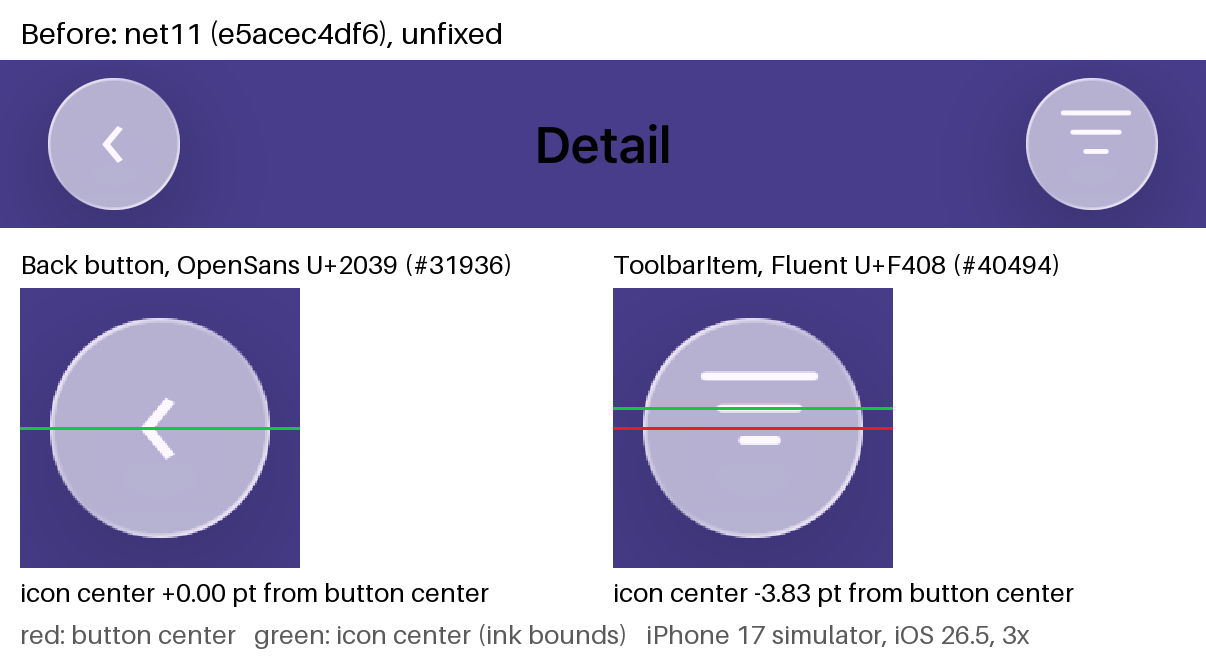 | 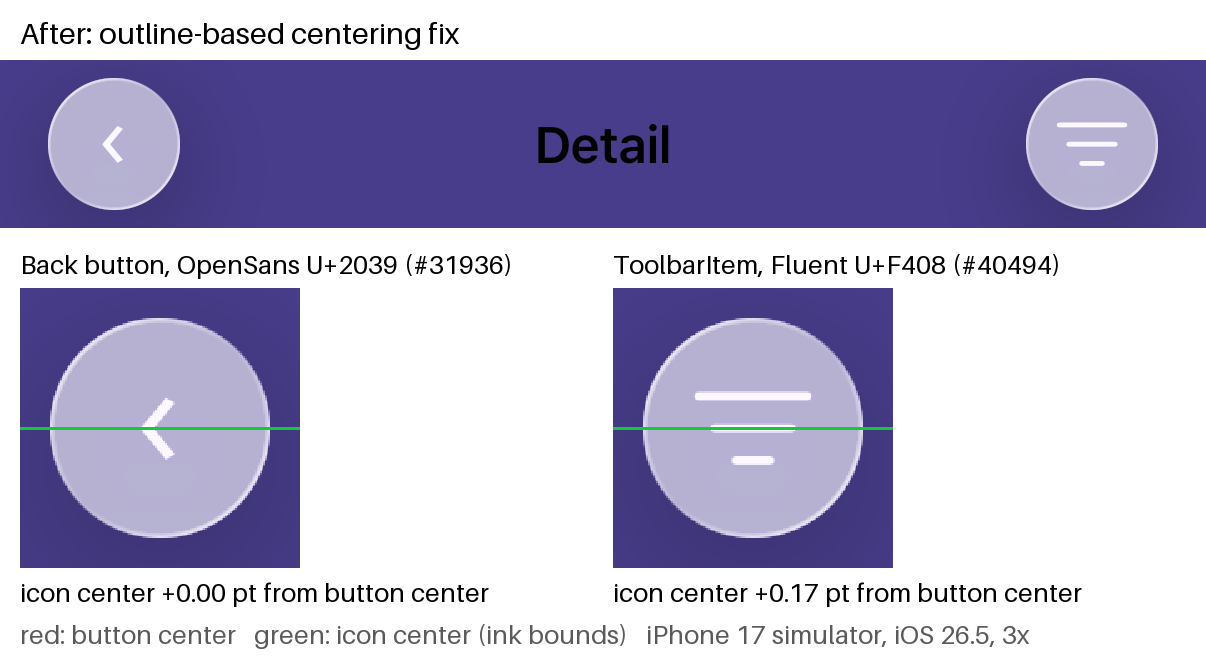 | Full clips: [before.mp4](https://raw.githubusercontent.com/MykhailoDav/maui/media-pr-2026-11-12/40494-before.mp4) · [after.mp4](https://raw.githubusercontent.com/MykhailoDav/maui/media-pr-2026-11-12/40494-after.mp4) Not checked: Mac Catalyst, iOS 27 (my iOS 27 runtime can't run the test app), and the Issue31936 UI test under Appium (I measured its glyph with the same method instead). An emoji is centered by its stored box, which includes the transparent margin of the bitmap. ### Issues Fixed Fixes #40494 Co-authored-by: Jakub Florkowski <kubaflo123@gmail.com>




Description of Change
On iOS 26+, #39230 centers a
FontImageSourceglyph byCTLine.GetBounds(CTLineBoundsOptions.UseGlyphPathBounds). Despite the name, that returns the glyph bounding box stored in the font, not the bounds of the outline. For most fonts the two are the same. Fluent System Icons stores loose boxes anchored at (0,0) for almost all of its glyphs, so centering the stored box moves the visible icon. For the issue's filter glyph (U+F408) at 30 pt, the stored box's center is 11.25 pt from the bottom and the outline's is 15.27 pt, so the icon is drawn about 4 pt above the center of the image.UIKit isn't involved: in the toolbar, the 30×30 image view and the glass button have the same center.
The image is now centered on the union of the glyph outlines (
CTFont.GetPathForGlyphfor each glyph in the line). Glyphs without an outline, such as emoji, which are bitmaps, add the box the font stores for them instead. This keeps #39230's approach and only changes how the ink is measured. Glyphs whose stored box matches the outline, such as the OpenSans‹from #31936, don't move.Measured on an iPhone 17 simulator (iOS 26.5), offset of the icon's ink center from the button center:
net11The glyphs in the ios-26 snapshots that #39230 updated (FA U+F015, OpenSans U+0489, system "+") move by 0.03 pt or less, measured with CoreText on macOS, not on iOS.
Tests
FontImageSourceServiceTests.GlyphOutlineIsCenteredWhenStoredGlyphBoundsDiffer(Core device tests, iOS) renders an Ionicons and a FontAwesome glyph whose stored boxes differ from their outlines. Both fonts are already embedded in the test app. On iOS 26+ it checks that the ink is within 1 px of the image center.Assert.InRange() Failure, off by 4.5 px and 3.5 px)The existing #39230 tests (
GlyphIsCenteredWithoutChangingFontMetrics,RenderingModeIsPreserved) still pass.GlyphWithoutOutlineIsNotClipped(added after review) renders "X😀" and checks that the ink doesn't touch the image edges. The first version of this PR measured outlines only, so it centered the "X" and pushed the emoji past the right edge: the test fails on that commit (ink at 169–515 px in a 515 px wide image). With the current fix the ImageSource category has 78 passed, 2 skipped.Before / after (sandbox app built from source, iPhone 17 simulator, iOS 26.5): a pushed page whose back button uses the #31936 glyph and whose ToolbarItem uses the Fluent filter glyph. The red line is the button center, the green line the icon center.
Full clips: before.mp4 · after.mp4
Not checked: Mac Catalyst, iOS 27 (my iOS 27 runtime can't run the test app), and the Issue31936 UI test under Appium (I measured its glyph with the same method instead). An emoji is centered by its stored box, which includes the transparent margin of the bitmap.
Issues Fixed
Fixes #40494