Repository navigation
ML.NET Builder Get Started sample throw excepion when Train time longer than 60 sec #238

Description
Activity
Seems to be the ModelBuilder that still use cli... We can try if it will reproduce on the latest release version
His also happens to me whenever i try to train my Sentiment Analysis module. 10s and it throws this error. This was after the last update.
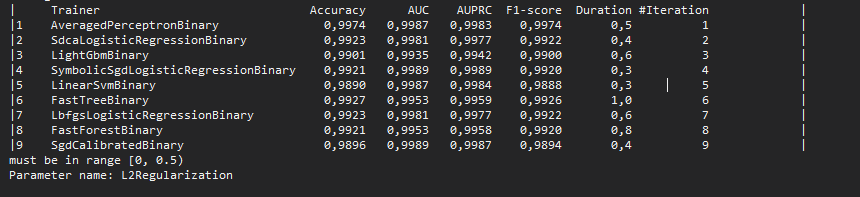
in case you training model from csv file - ensure there is no empty line at the end of the file.
Duplicate of dotnet/machinelearning#567
Fixed by dotnet/machinelearning#579Please re-open if you still see this issue. It's possible the sweep ranges were not propagated to the sweep ranges used by AutoML.
Side note: AutoML should be directly accessing the sweep ranges of the ML.NET components. Instead it maintains its own copy of the sweep ranges.
I had this exact issue, and the problem was a blank line at the end of my dataset, like @mindaugas-j pointed out - thanks!
Hmm, well, removing the blank line helped for one dataset, but not for another. Seems this problem is not fixed after all:
Exploring multiple ML algorithms and settings to find you the best model for ML task: multiclass-classification For further learning check: https://aka.ms/mlnet-cli ▓▓▓▓▓▓▓▓▓▓▓▓▓▓▓▓▓▓▓▓────────────────────────────────────────────────────────────────────────────────────────────────────Best Accuracy: 79,12%, Best Algorithm: LbfgsLogisticRegressionOva, Last Algorithm: LbfgsMaximumEntropyMulti 00:05:04 Exception occured while exploring pipelines: must be in range [0, 0.5)─────────────────────────────────────────────────────────────────────────────────────────────── Parameter name: L2Regularization Please see the log file for more info. Exiting ...I just got the exact same problem. Removing the blank line at the end of the file also seems to fix it for one dataset, but then I tried with another and the problem is back.


System Information
Bug description
Model Builder Get Started, on step :
https://dotnet.microsoft.com/learn/ml-dotnet/get-started-tutorial/train
using wikipedia-detox-250-line-data.tsv, when train time is longer or equal than 60 sec,
output shows :
Exception occured while exploring pipelines:
b__0(NewCommandSettings options)must be in range [0, 0.5)
Parameter name: L2Regularization
System.ArgumentOutOfRangeException: must be in range [0, 0.5)
Parameter name: L2Regularization
at Microsoft.ML.CLI.CodeGenerator.CodeGenerationHelper.GenerateCode()
at Microsoft.ML.CLI.Program.<>c__DisplayClass1_0.
Please see the log file for more info.
Exiting ...
Last tested algorithm visible in output is :
|9 SgdCalibratedBinary 0,7317 0,8104 0,9053 0,7925 1,4 0 |
Steps to Reproduce
Expected behavior
Same as you train it shorter, no errors but starting next step
Screenshots
