Repository navigation
Wrong path for tflite.wasm #16
Description

I'm trying to add the virtual background to an angular 11 project and getting an error when trying to load the tflite model:
GET http://localhost:4200/tflite.wasm 404 (Not Found)
tflite.js:9 wasm streaming compile failed: TypeError: Failed to execute 'compile' on 'WebAssembly': HTTP status code is not ok
tflite.js:9 falling back to ArrayBuffer instantiation
GET http://localhost:4200/tflite.wasm 404 (Not Found)
failed to asynchronously prepare wasm: RuntimeError: abort(both async and sync fetching of the wasm failed). Build with -s ASSERTIONS=1 for more info.
This is how I import tflite.js:
import createTFLiteModule from './tflite/tflite';
import createTFLiteSIMDModule from './tflite/tflite-simd';
The path to tflite.wasm is hardcoded in tflite/tflite.js. Is there a config option to set the path without modifying tflite.js?
var wasmBinaryFile="tflite.wasm"
Activity
Volcomix commentedon May 30, 2021
I hope there is a way to import wasm module using ES modules like you did but I haven't found the right way to do it. So what I did in this demo was to put
tflite.jsandtflite.wasmin the public directory (akaassetsin Angular), manually added the required<script>tags inindex.htmland manually declaredcreateTFLiteModulefor TypeScript to be happy when calling it without any associatedimport.benbro commentedon May 30, 2021
I didn't find a way to set the path yet. Maybe we can add a global variable like TFLITE_URL and TFLITE_SIMD_URL that the js file will use if exists. Not sure if relevant.
Volcomix commentedon May 30, 2021
Actually
tflite.jsandtflite.wasmare generated by emscripten and the glue code in the js file is overwritten each time I build tflite in wasm. I don't think that would be a good idea to edit the file manually so unless there is an existing option in emscripten to specify the wasm file URL (which I can't find), I don't see any other alternative than importing those files from outside of the bundled code.benbro commentedon May 30, 2021
Relative path should work when loading tflite.js in a script tag because the glue code use document.currentScript.url. See emscripten-core/emscripten#5368
Angular dev server generate the html dynamically with <script src="app.js"></script>. That's why document.currentScript.url points to the root path.
I think on dev we can add a proxy that handles the wasm files specifically. Maybe with "ng serve --proxy-config proxy.conf.json".
On production, as long as the .js and wasm files will be in the same path it should work because of document.currentScript.url.
benbro commentedon May 30, 2021
Maybe we need
Volcomix commentedon May 30, 2021
Running a build with this option (cdad50c): https://github.com/Volcomix/virtual-background/actions/runs/890576517
benbro commentedon May 30, 2021
There is also USE_ES6_IMPORT_META=1:
// Use the ES6 Module relative import feature 'import.meta.url'
// to auto-detect WASM Module path.
// It might not be supported on old browsers / toolchains
var USE_ES6_IMPORT_META = 1;
Volcomix commentedon May 30, 2021
I updated tflite js files in this branch. React is yelling at me when trying to import them as ES6 modules:
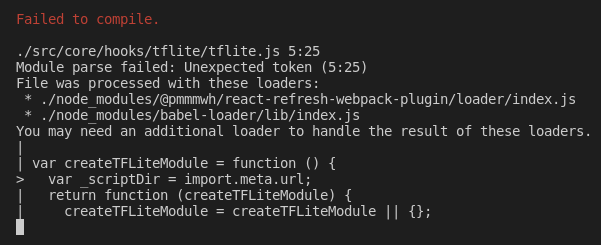
But maybe could you have more luck with Angular.
USE_ES6_IMPORT_META is enabled by default so I'm gonna run a new build with this option disabled.
benbro commentedon May 31, 2021
I'm getting a similar error with Angular 11. EXPORT_ES6=1 with import.model.url is probably the solution but react and angular tooling are not compatible with import.model yet.
benbro commentedon May 31, 2021
I still prefer the automatic import.model.url solution but we can also pass custom locateFile function:
Volcomix commentedon Jun 12, 2021
Still an error with
"-s USE_ES6_IMPORT_META=0":benbro commentedon Jun 12, 2021
Not sure about complication flags but we can use locateFile to dynamically specify the model location.
This is from the Selfie Segmentation example: