Repository navigation
BGRA Jpg incorrectly decoded. #1746
Description
Activity
If I got you right, you have an bgra image encoded via jpeg format, right?
Jpeg doesn't support bgra format;
Images encoded with four components are assumed to be CMYK, with (0,0,0,0) indicating white unless the image contains an APP14 marker segment as specified in 6.5.3, in which case the colour encoding is considered either CMYK or YCCK according to the application data of the APP14 marker segment. The relationship between CMYK and YCCK is defined as specified in clause 7.
May I ask you where did you re-encode png -> jpeg with bgra colorspace?
The jpeg data comes from a .blp file, which is a file format that contains embedded jpeg or dds images and supports mipmaps.
https://github.com/Drake53/War3Net/blob/master/tests/War3Net.Common.Testing/TestData/Blp/VillageFallStonePath.blpI'm not familiar with jpeg specifications, all I know is that using BitmapSource I am able to decode the .jpg correctly.
https://github.com/Drake53/War3Net/blob/master/src/War3Net.Drawing.Blp/BlpFile.csHowever, WPF is windows only, so I'd prefer to use a cross-platform library instead.
The color space of this image is CMYK. It has no APP14 marker and has 4 components. I think we are just missing a check, if the adobe marker has its default value?
@brianpopow seems like. Should be something like this:
return !this.adobe.Equals(default) && this.adobe.ColorTransform == JpegConstants.Adobe.ColorTransformYcck
                    ? JpegColorSpace.Ycck
                    : JpegColorSpace.Cmyk;
Not sure checking if entire struct is default is a good solution though, maybe it's better to do a switch with throw
ImageFormatExceptionon default? Right now entire color deduction can pass without a warning if image has some invalid colorspace data.Still does not look as expected with CMYK:

but it looks the same when i convert it with imagemagick to a png.
Does the image contain a color profile?
Does the image contain a color profile?
no, there is no color profile
Odd. Try decoding it to rgb. I’m amazed WPF can decode it since it’s seems off spec.
looks pretty much the same, except the black area is white.

imagemagick identify says it should be CMYK
https://www.hiveworkshop.com/threads/blp-specifications-wc3.279306/
blp is pretty messed up. WCF must fall back to BGRA once it exhausts all standard possibilities.
imagemagick identify says it should be CMYK
It's a specification-complient fallback for 4-component image without APP14 marker.
Jpeg simply does not support alpha channels, Jpeg2000 does.
Link provided by @JimBobSquarePants even states that blp jpeg content type had some custom code via framework. I've failed to find anything related to it so it's impossible to say anything about how given file was produced.
Blizzard uses the now discontinued Intel Imaging Framework to produce/decode the JPEG content meaning that each jpegHeaderChunk of official BLP files contains its signature.
Played a bit with the binary, provided .blp file is basically a container with jpeg at the top and something else after the image, it has an explicit valid
SOI -> ... -> EOImarker sequence which leads to exact same jpeg provided by the OP. It has 4 components, nothing else -> it's a CMYK file according to jpeg specification. Photoshop, JPEGSnoop, Forensically and internet browsers treat this as a CMYK image.If it's really a bgra image, CMYK components should store BGRA data in each channel so the only viable solution atm is (simplified):
foreach pixel in decodedImage:
    newImage[i] = new BGRA(pixel.C, pixel.M, pixel.Y, pixel.K)
Decoding such 'custom' jpeg images is actually possible with decoder change in #1694. Decoding is done by a virtual method of an internal class which can be exposed to the end user. Question is: do you guys want it to be exposed for cases like this? @JimBobSquarePants @brianpopow
Let me do some research. I want to figure out how
JpegBitmapDecoderworks.@JimBobSquarePants It does not work with given image, following code prints
Decoder format: Cmyk32:const string pathTemplate = "path\\{0}.jpg"; using Stream inputStream = File.Open(string.Format(pathTemplate, "VillageFallStonePath"), FileMode.Open); var decoder = new JpegBitmapDecoder(inputStream, BitmapCreateOptions.PreservePixelFormat, BitmapCacheOption.Default); Console.WriteLine($"Decoder format: {decoder.Frames[0].Format}");
Saving it with
JpegBitmapEncoderproduces the same image:var encoder = new JpegBitmapEncoder(); encoder.Frames.Add(decoder.Frames[0]); using Stream outputStream = File.Open(string.Format(pathTemplate, "re_VillageFallStonePath"), FileMode.OpenOrCreate); encoder.Save(outputStream);
This image was encoded via the code above:
https://user-images.githubusercontent.com/20967409/130426883-3632f04e-94e8-43c2-aecc-2d33aa7fd023.jpgReacted by James Jackson-SouthThen @Drake53 we're going to need proof of this in code form.
all I know is that using BitmapSource I am able to decode the .jpg correctly.
I use this code to compare the png and jpg files:
using System.IO;
using System.Windows.Media;
using System.Windows.Media.Imaging;
using Microsoft.VisualStudio.TestTools.UnitTesting;

    [TestClass]
    public class JpgWpfTests
    {
        [TestMethod]
        public void Test()
        {
            var pngFilePath = Path.Combine(path, "VillageFallStonePath.png");
            var jpgFilePath = Path.Combine(path, "VillageFallStonePath.jpg");

            using var expectedImageStream = File.OpenRead(pngFilePath);
            var expectedImageDecoder = new PngBitmapDecoder(expectedImageStream, BitmapCreateOptions.None, BitmapCacheOption.Default);
            var expectedPixelBytes = GetPixels(expectedImageDecoder, out var expectedPixelFormat);

            using var actualImageStream = File.OpenRead(jpgFilePath);
            var actualImageDecoder = new JpegBitmapDecoder(actualImageStream, BitmapCreateOptions.PreservePixelFormat, BitmapCacheOption.Default);
            var actualPixelBytes = GetPixels(actualImageDecoder, out var actualPixelFormat);

            Assert.AreEqual(expectedPixelFormat.BitsPerPixel, actualPixelFormat.BitsPerPixel);
            Assert.AreEqual(expectedPixelBytes.Length, actualPixelBytes.Length);

            for (var i = 0; i < actualPixelBytes.Length; i++)
            {
                actualPixelBytes[i] = (byte)(255 - actualPixelBytes[i]);

                Assert.AreEqual(expectedPixelBytes[i], actualPixelBytes[i], 1f);
            }
        }

        private static byte[] GetPixels(BitmapDecoder decoder, out PixelFormat pixelFormat)
        {
            var bitmap = decoder.Frames[0];
            pixelFormat = bitmap.Format;

            var bytesPerPixel = (pixelFormat.BitsPerPixel + 7) / 8;
            var stride = bitmap.PixelWidth * bytesPerPixel;

            var pixelData = new byte[stride * bitmap.PixelHeight];
            bitmap.CopyPixels(pixelData, stride, 0);

            return pixelData;
        }
    }
What’s going on here?
actualPixelBytes[i] = (byte)(255 - actualPixelBytes[i]);
WPF doesn't do it 100% as I expect it either, so when I expect 255 I get 0 instead, and vice versa. This is for all 4 BGRA channels, so I simply adjust all bytes like that to get the values I expect.
so when I expect 255 I get 0 instead, and vice versa
Is
255 - pixelByteformula based on these edge cases expectation only?I think we're chasing ghosts here. Our jpeg decoder should match the specification and no existing standalone decoder can yield an expected result.
Yes, it's only needed for this edge case.
I tested saving the .png as .jpg (losing the alpha channel in the process), then saving that .jpg as 24bpp .png, and comparing these two new files. To make the test succeed, I had to remove that255 - pixelbyteformula (and also use PreservePixelFormat for the .png so the format isn't changed to 32 BitsPerPixel).I tested saving the .png as .jpg (losing the alpha channel in the process), then saving that .jpg as 24bpp .png, and comparing these two new files.
That is expected, you've literally re-encoded same pixel data via
png -> jpg -> png. Problem with your file is that it's not a JPEG. It uses JPEG file structure and compression but actual color data is not CMYK as expected by a jpeg specification. Big companies like Blizzard usually write their specific encoders/decoders for such thins like custom image containers.Custom decoding can be supported - I've posted the solution above (I can work on it specifically a bit later, working on other things atm) but it really depends on the decision by @JimBobSquarePants whether it's worth the complexity of exposing internal stuff for specific cases like this one.
I don't think that exposing internals for highly specialized use cases is a good direction, and I don't see that there is a way to define a thin, minimalistic API to tweak color channels. We need to carry out significant refactors without breaking changes (like #1694 or the stuff we need to do if we want to address #1371).
Minimalistic? Very unlikely.
I've actually thought about sort of a proposal for exposing it but for a different cause - re-encoding jpeg block by block like NetVips does it. It's not that significant in terms of refactoring and won't even introduce any breaking changes, the only thing is needed is to exposeSpectralConverterbase class is it's the only thing doing actual conversion from spectral to image:ImageSharp/src/ImageSharp/Formats/Jpeg/JpegDecoderCore.cs
Lines 174 to 188 in 5d82124
Case-specific converter implementations are the main concern here but they can be flexible IMO.
This and provided topic about specific area decoding are very interesting situations for sure but I'm currently working on jpeg codec performance (get ready for something huge in the following weeks btw :D) so I can't really deal with it atm but in the future maybe?...
I'm closing this as wontfix for now. Opening up Jpeg decoder internals for very special use cases is not where our efforts should go today.
Reacted by Brian Popow, James Jackson-South and Dmitry


Prerequisites
DEBUGandRELEASEmodeDescription
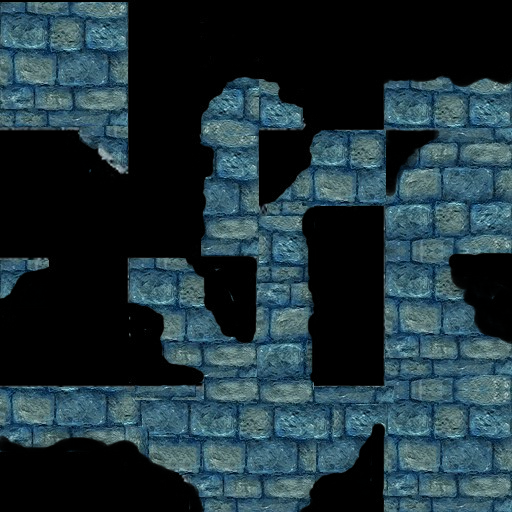
Trying to load a .jpg file with BGRA data gets incorrectly decoded as if it's YCbCr. As a result, the colours are incorrect and there's no alpha channel.
Steps to Reproduce
Simply load the example .jpg file:
https://github.com/Drake53/War3Net/blob/master/tests/War3Net.Common.Testing/TestData/Blp/VillageFallStonePath.jpg
Note that github doesn't display it correctly either, it should look like this:
https://github.com/Drake53/War3Net/blob/master/tests/War3Net.Common.Testing/TestData/Blp/VillageFallStonePath.png
System Configuration