The fastest progress bar in Python, maintained since 2012.




Wrapping a fast loop in a progress bar can cost more than the loop itself, so the overhead per iteration is the number that matters. This race replays the measured wall-clock times of the same 1,000,000-iteration loop, wrapped with each library's default settings:
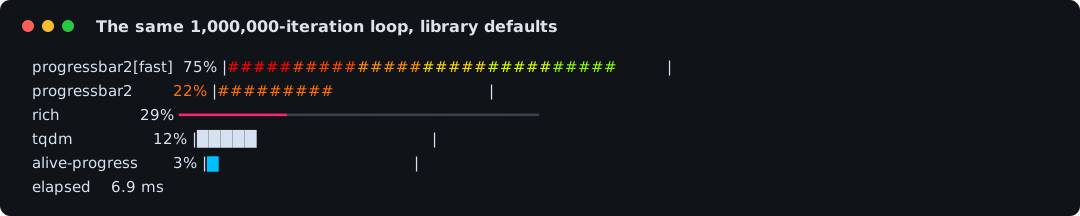
| Library | Overhead per iteration | Same loop, wall clock |
|---|---|---|
| progressbar2[fast] | 3.6 ns | 9.2 ms |
| rich | 18.2 ns | 23.8 ms |
| progressbar2 | 26.0 ns | 31.5 ms |
| tqdm | 52.1 ns | 57.6 ms |
| alive-progress | 243.3 ns | 248.9 ms |
| click | 1829.6 ns | 1835.2 ms |
The [fast] row is pip install 'progressbar2[fast]': an optional C
iterator from the speedups package
that counts natively and only calls back into Python when the bar
actually needs a redraw. A plain install runs the pure-Python gate at
26 ns, still twice as light as tqdm. Import weight follows the same
pattern: import progressbar costs 1.5 ms where tqdm takes 21.6 ms and
rich 45.6 ms, which your command-line tools will notice.
Note: These numbers come from one machine (Apple Silicon, CPython 3.13, output to a real pty) and from this exact test, measured by benchmarks/bench.py. Your numbers will differ.
clickis measured but left out of the race animation because its 1.8 s total would flatten every other lane. Reproduce withpython benchmarks/bench.py, full details in benchmarks/report.md.
pip install progressbar2           # pure Python
pip install 'progressbar2[fast]' # adds the native acceleratorThe common case needs one line around the iterable:
import time
import progressbar

for item in progressbar.progressbar(range(100), desc='Loading'):
    time.sleep(0.02)
Every example in the documentation runs live in the page. Press Run on any code block, no install required.
A bar can carry a color gradient that shifts with progress, a fixed
color, or an animated marker, and several styled bars can share the
terminal through one MultiBar:

"""Three styled bars at once: two color gradients and a fixed-color spinner.

`gradient_colors` shifts a bar's fill color as its percentage grows, so
the download bar sweeps red through gold to green and the render bar
sweeps sky blue into fuchsia. The scan bar has no percentage to sweep
(its length is unknown), so `fixed_colors` gives its animated marker one
unchanging cyan instead.
"""

import sys
import time

import progressbar
from progressbar.terminal import ColorGradient, colors
from progressbar.widgets import TFixedColors, TGradientColors

STEPS = 24

HEALTH = ColorGradient(colors.red, colors.gold1, colors.green)
NEON = ColorGradient(colors.deep_sky_blue1, colors.fuchsia)


def main() -> None:
    with progressbar.MultiBar(fd=sys.stdout) as multibar:
        multibar['download'] = progressbar.ProgressBar(
            max_value=STEPS,
            widgets=[
                progressbar.Percentage(),
                ' ',
                progressbar.Bar(
                    gradient_colors=TGradientColors(fg=HEALTH, bg=None),
                ),
            ],
        )
        multibar['render'] = progressbar.ProgressBar(
            max_value=STEPS,
            widgets=[
                progressbar.Percentage(),
                ' ',
                progressbar.Bar(
                    gradient_colors=TGradientColors(fg=NEON, bg=None),
                ),
            ],
        )
        multibar['scan'] = progressbar.ProgressBar(
            max_value=progressbar.UnknownLength,
            widgets=[
                progressbar.Bar(
                    marker=progressbar.AnimatedMarker(),
                    fixed_colors=TFixedColors(
                        fg_none=colors.cyan1, bg_none=None
                    ),
                ),
            ],
        )

        for step in range(STEPS):
            multibar['download'].update(step + 1)
            multibar['render'].update(max(0, step - 4))
            multibar['scan'].update(step + 1)
            # Longer than the bars' 0.05s update gate, so every step
            # lands as a visible redraw.
            time.sleep(0.1)

        multibar['render'].update(STEPS)
        for bar in multibar.values():
            bar.finish()


if __name__ == '__main__':
main()Anything the program prints while a bar is running would normally tear
the bar apart. With redirect_stdout the output lands cleanly above
the bar instead:

"""A build log printing above a progress bar without corrupting it."""

import time

import progressbar

STEPS = 24


def main() -> None:
    with progressbar.ProgressBar(
        max_value=STEPS,
        prefix='Build ',
        redirect_stdout=True,
    ) as bar:
        for step in range(STEPS):
            if step in {8, 16}:
                print(f'log: completed step {step}')
            bar.update(step + 1)
            # Longer than the bar's 0.05s update gate, so every step
            # lands as a visible redraw.
            time.sleep(0.1)


if __name__ == '__main__':
    main()
Logging integrates the same way, covered in the logging how-to.
MultiBar lays out any number of named bars, updates them from any
thread, and waits for all of them on exit:

"""Two named bars progressing at different rates in one terminal."""

import sys
import time

import progressbar

STEPS = 24


def main() -> None:
    with progressbar.MultiBar(fd=sys.stdout) as multibar:
        build = multibar['build']
        test = multibar['test']
        build.max_value = STEPS
        test.max_value = STEPS
        for step in range(STEPS):
            build.update(step + 1)
            test.update(min(STEPS, max(0, round((step - 3) * 1.2))))
            # Longer than the bars' 0.05s update gate, so every step
            # lands as a visible redraw.
            time.sleep(0.1)

        # Reaching max_value doesn't finish a bar -- only finish() does.
        # A MultiBar waits for every bar to report finished() before its
        # context manager can exit, so without these calls the block
        # above would hang forever on exit.
        build.finish()
        test.finish()


if __name__ == '__main__':
main()Running a function over a batch of items usually means wiring an executor, a results collection, and a progress display together by hand. One call does all three, on threads, processes, or asyncio:
import progressbar

results = progressbar.map(fetch, urls, workers=8)  # threads
results = progressbar.map(crunch, files, pool='process')  # processes
results = await progressbar.amap(fetch, urls)  # asyncio

# A progress-bar'd xargs -P:
progressbar.run('gzip -k {}', files, workers=4)

# An overall bar plus one bar per in-flight task:
progressbar.map(crunch, files, workers=4, bar='multi')
Results come back in input order, imap/imap_unordered stream them
instead, and gather is a drop-in asyncio.gather with a bar. The
animation below runs eight tasks on a thread pool, each reporting
sub-progress through its own bar:
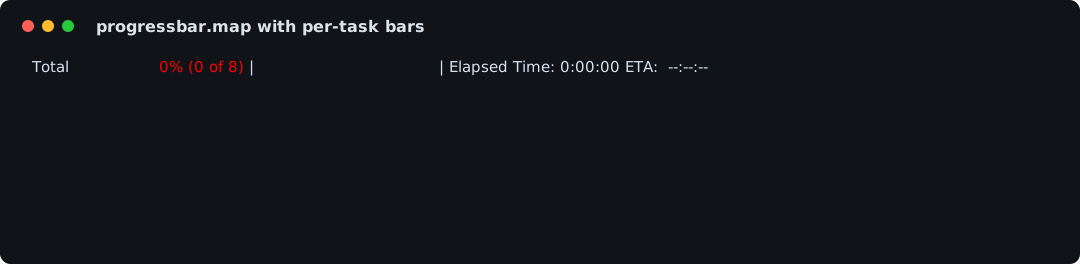
"""One call fans work out to threads and renders every bar for you.

`progressbar.map` runs `crunch` over the batch on a thread pool and
drives one overall bar plus a live bar per running task. The everyday
spelling is `bar='multi'`. Handing it a `MultiBar` instance instead, as
here, lets the finished overall bar stay on screen when the run ends.
Inside a task, `progressbar.current_task_bar()` hands back that task's
own bar so it can report sub-progress too.
"""

import sys
import time

import progressbar

FILES = [
    'alpha.dat',
    'bravo.dat',
    'charlie.dat',
    'delta.dat',
    'echo.dat',
    'foxtrot.dat',
    'golf.dat',
    'hotel.dat',
]


def crunch(path: str) -> str:
    # Deterministic, per-file amount of work: later files take longer,
    # so the bars visibly finish one after another.
    bar = progressbar.current_task_bar()
    for block in range(4 + FILES.index(path)):
        if bar is not None:
            bar.update(block + 1)
        time.sleep(0.05)
    return path


def main() -> None:
    multibar = progressbar.MultiBar(fd=sys.stdout, sort_reverse=False)
    results = progressbar.map(crunch, FILES, workers=8, bar=multibar)
    assert results == FILES
    # One more beat before the interpreter exits, so the finished
    # overall bar's final redraw reaches the terminal.
    time.sleep(0.1)


if __name__ == '__main__':
    main()
Errors, timeouts, pools, and the decorator form are covered in the parallel execution guide.
Installing the package also installs a progressbar command, a Python
implementation of the classic Unix pv: it copies input to output and
draws the transfer on stderr, so it drops into pipelines:
# File to file, with percentage, timer, ETA, rate and byte count:
progressbar --progress --timer --eta --rate --bytes data.bin -o copy.bin

# In a pipeline, data on stdout and progress on stderr:
tar cf - src/ | progressbar --bytes --rate > backup.tar
The animation is this exact transfer, driven in-process by
docs/examples/readme/cli.py:
4 MiB copied at a rate-limited 2 MiB/s. Rate limiting (--rate-limit),
line counting (--line-mode), and most other pv flags are there,
progressbar --help lists the full set.
Work without a known total still gets a useful bar, an animated marker with a counter instead of a percentage:

"""A bar for work whose total is not known up front."""

import time

import progressbar


def main() -> None:
    with progressbar.ProgressBar(
        max_value=progressbar.UnknownLength,
    ) as bar:
        for value in range(0, 120, 10):
            bar.update(value)
            # Longer than the bar's 0.05s update gate, so every step
            # lands as a visible redraw.
            time.sleep(0.1)


if __name__ == '__main__':
main()The features above are the flashy half. The other half is why the package has survived since 2012:
- Supported non-stop since 2012, with 111 releases on PyPI, and since
2008 before that as the original
progressbarlibrary, which progressbar2 still replaces drop-in. - 1133 tests at 100% branch coverage, enforced in CI on every commit.
- Fully typed (PEP 561
py.typed), so your type checker sees the real signatures. - Python 3.10 through 3.14, plus PyPy, with 3.15 pre-releases already in CI.
- The animated demos on this page are rendered from real captured terminal output and re-verified byte-for-byte in CI, so what you see is what the library actually draws.
- JetBrains IDEs need "Enable terminal in output console" for advanced
terminal behavior such as
MultiBar. - IDLE does not support terminal progress bars.
- Jupyter buffers stdout, so call
sys.stdout.flush()when output appears late.
progressbar2 is based on the old Python progressbar package that was published on the now defunct Google Code. Since that project was completely abandoned by its developer and the developer did not respond to email, I decided to fork the package.
This package is still backwards compatible with the original progressbar package so you can use it as a drop-in replacement for existing projects.
- Documentation: https://progressbar-2.readthedocs.io/en/latest/
- Source: https://github.com/wolph/python-progressbar
- Bug reports: https://github.com/wolph/python-progressbar/issues
- Package homepage: https://pypi.org/project/progressbar2/